
 Share
Share
 Print
Print
|
|
|
|
|


Inventory Supervisor, General Tab
Enter one or more search criteria in the General Tab and then select the Find  button. Once the desired record has been found, select the Select
  button to enter the P/N details window.
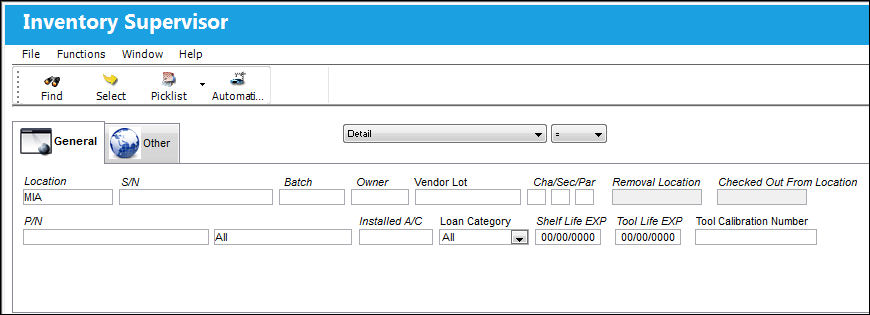
The following information/options are available in this window:
_____________________________________________________________________________________
Location
The Location for maintenance events, inventory stores, orders, transactions, or training events.
S/N
The Serial Number for the specific serialized part.
Batch
The inventory number that is currently associated with a part or group of parts. A part's Batch number can change after various types of transactions take place.
Owner
The name of the owner of the part, when applicable.
Vendor Lot
Vendor batch number of the part entered upon receiving or initial load, as applicable. This field can contain up to 20 characters.
Chap/Sec/Par
The ATA chapter/section/paragraph, as applicable.
Removal Location
Allows users to search for parts Pending Inventory via the location that the parts have been removed from.
This field is only available when the search type drop down is set to Pending Inventory.
Checked Out From Location
The Location from which a Tool was originally checked out.
This field is only available when the search type drop down is set to Tools Locator.
Note: This field cannot be utilized with the Protect Location checkbox selected in the user's Security settings. For more information, refer to the Security, General Tab.
P/N
The Part Number reference for the aircraft part.
Inventory Type drop down
The type of inventory the item is registered as in the system. The available options are All, General, GSE and Maintenance Inventory. All is set as the default.
Installed A/C
The aircraft in which the part is currently installed.
Loan Category
Loan Part Category (short, long, consigned, manage or pool).
Shelf Life EXP
The shelf life expiration date of the part, as applicable.
Tool Life EXP
The tool life expiration date of the part, as applicable.
Tool Calibration Number
This is a unique number used to define a tool.
_____________________________________________________________________________________
Share
Print
|
©1997-2026 Trax USA Corp. All rights reserved. This manual may not be copied, photocopied, reproduced, translated, or converted to any electronic or machine-readable form, in whole or in part, without prior written approval from Trax USA Corp. |
 |