
 Share
Share
 Print
Print
|
|
|
|
|


Inventory Supervisor Detail
Inventory Supervisor is a very powerful tool and should not be used on a regular basis.
The Inventory Supervisor feature offers several options for data cleansing, such as the following:
- the merging of part number histories (batches)
- inventory status changes
- correction of parts installed on aircraft
- building of assemblies
- corrections of any receiving information such as part number, serial number, etc.
- corrections of receiving inspection information such as tags, deletion of a part number record
- correcting owner information, and part number controls, to name a few.
Due to the multiple options that the Inventory Supervisor offers, the only Inventory Transaction code that will be recorded against the Inventory, Transaction History tab is ‘SUP/UPDATE’. For this reason, it is especially useful for the user to create and save transactions notes.
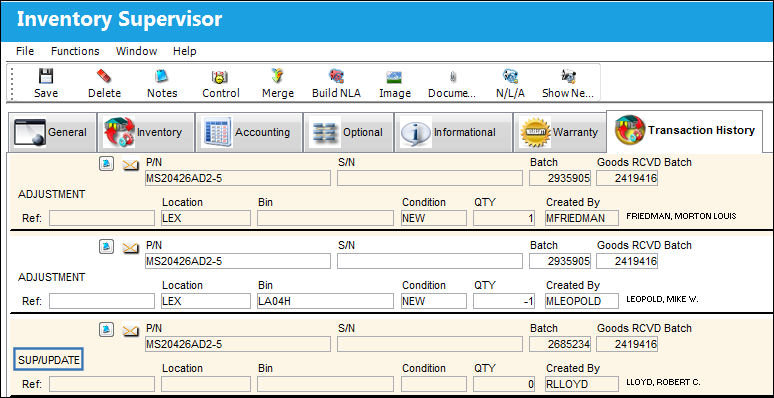
Without the transaction note, it is not clear to the next user viewing the part’s Transaction History tab to identify which particular function was carried out against the part number.
The following tabs and buttons are available:
Inventory Supervisor Detail Tabs |
Inventory Supervisor Detail Buttons |
|
A/C Tab
|
|
 Save button


 Build NLA button

 N/L/A button
 Show Next Higher PN button
For information on accessing this window, refer to the Inventory Supervisor.
Share
Print
|
©1997-2026 Trax USA Corp. All rights reserved. This manual may not be copied, photocopied, reproduced, translated, or converted to any electronic or machine-readable form, in whole or in part, without prior written approval from Trax USA Corp. |
 |