
 Share
Share
 Print
Print
|
|
|
|
|


The Inventory Supervisor Compliance tab displays all the P/N Controls and P/N E/Cs that have been complied with against the P/N S/N.
Within the Compliance tab, the Delete  button enables users to delete individual compliance records. The user must ensure the correct compliance record is chosen before selecting the Delete button.
Deleting a compliance record will not automatically change the effective date of the E/C or P/N CTL.
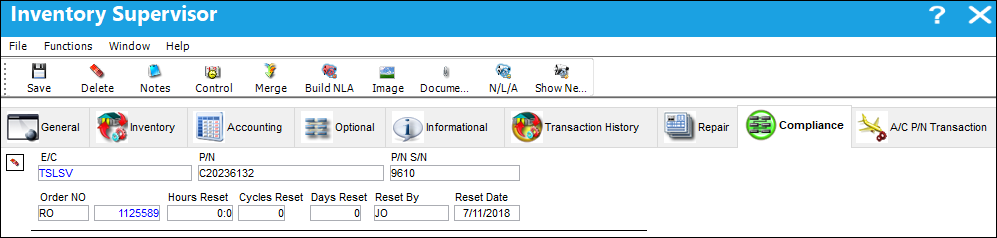
The following information/options are available in this window:
_____________________________________________________________________________________
E/C
The Engineering Control or P/N Control that the compliance record was written for.
P/N
The Part Number reference for the aircraft part.
P/N S/N
The Serial Number for the specific serialized part.
Order NO
The type of order and the order number for the transaction.
Hours/Cycles/Days Reset
Hours/Cycles/Days accumulated when the control was reset.
Reset By
The user that accomplished the Work Order Closing (Production or Shop), receiving of the Repair Order, completion of Receiving Inspection, or Manual Compliance.
Reset Date
The date the E/C was complied with.
_____________________________________________________________________________________
Information for the Hours Reset, Cycles Reset and Days Reset fields are added from the P/N Total Hours and Cycles at compliance.
 Share
Print
Share
Print
|
©1997-2026 Trax USA Corp. All rights reserved. This manual may not be copied, photocopied, reproduced, translated, or converted to any electronic or machine-readable form, in whole or in part, without prior written approval from Trax USA Corp. |
 |