
 Share
Share
 Print
Print
|
|
|
|
|


Before self assignments can appear in the Employee Schedule Self Management window, the employee must have skills assigned to themselves. It is based on the skills needed to carry out work created by a Planner, that these assignment will be available.
The steps outlined below must be completed before an employee can assign themselves work.
1. Assign one or more Skills to the employee.
a. Go to Settings/Update/Employee Master.
b. Find the employee and be sure they are assigned with one or more skills.
Employee 'DONNA' has the following skills:
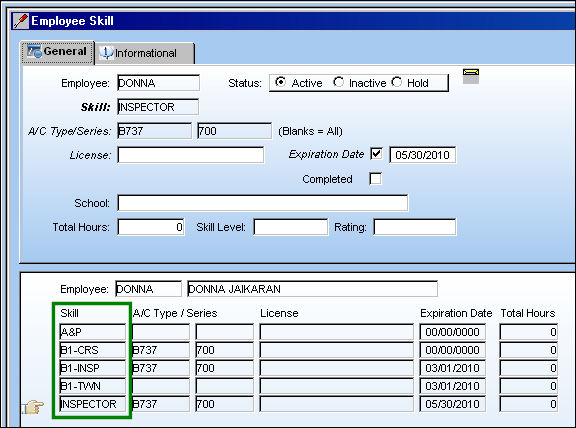
For information on how to assign skills to an employee refer to the Employee Master, Skill Button via the Employee Master section which can be found in the Settings Training manual.
Regardless of whether the Site field is populated in the Employee Master, only Self Assignment Schedules with Work Orders with a Site populated will appear in the Employee Self Assignment window.
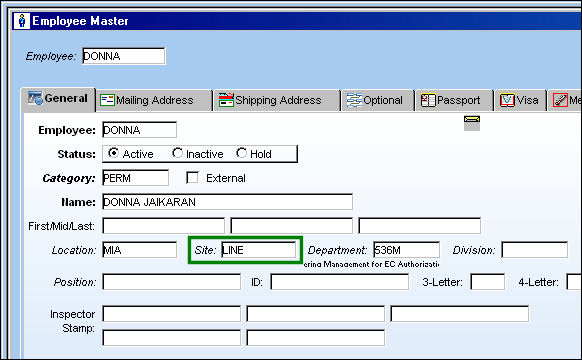
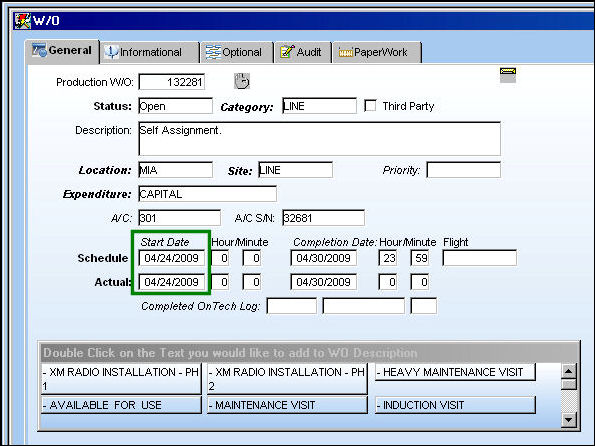
2. Create a Work Order for the same location 'MIA.'
Be sure the 'Start Date' is greater than the current date. If it is less than the current date, the Self Assignment for the Work Order will not appear in the Employee Self Assignment window.
3. Add a Task Card to the Work Order.
For information on how to add a Task Card to a Work Order, refer to the Task Card Button via the Work Order section which can be found in the Production Training manual.
4. Add a Skill to the Task Card. Be sure the Skill selected is a Skill that the employee is set up with in the Employee Master.
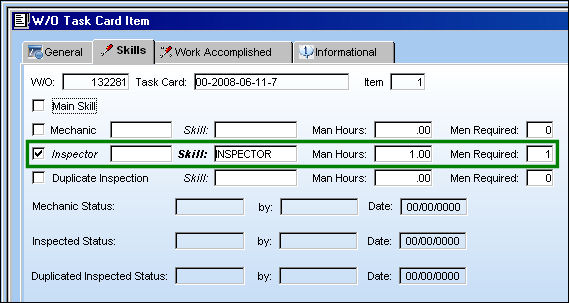
Now that the above steps have been completed, go to Generate Self Assignment Schedule via Employee Schedule Self Management which can be found in the Planning Training manual.
Share
Print
|
©1997-2026 Trax USA Corp. All rights reserved. This manual may not be copied, photocopied, reproduced, translated, or converted to any electronic or machine-readable form, in whole or in part, without prior written approval from Trax USA Corp. |
 |