
 Share
Share
 Print
Print
|
|
|
|
|


An operator exports the A/C data of an aircraft that is being sold or transferred to another operator. The data is exported to files that will be given to the new operator that also uses TRAX Software. The data is simultaneously exported and archived by the system. The aircraft will be removed from the Aircraft Master and all records removed from the system. The archived data can still be viewed using the “A/C on Hold Queries” in the Engineering, Production, Settings, Shop and Technical Records Modules. Refer to the 'Querying The Aircraft Currently On Hold' section of this manual for more information.
Export an aircraft as follows:
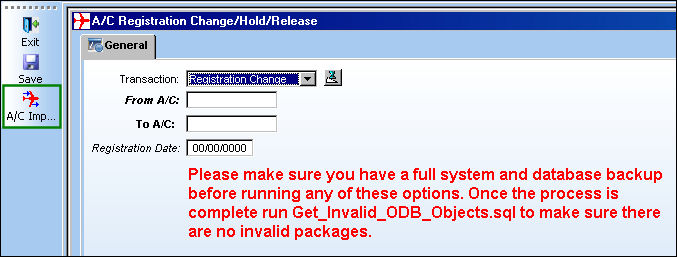
From the A/C Registration Change/ Hold/ Release window, select the A/C Import/ Export  button.
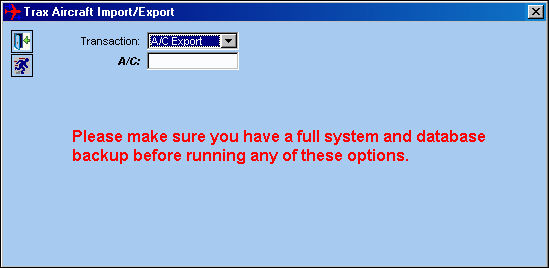
- Select 'A/C Export' in the Transaction Field.
- Select an A/C in the A/C Field.
- Select the Run
 button.
 - Select 'OK' to begin the export.
A window will appear when the export is complete.
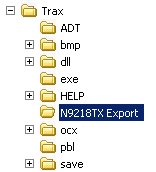
A folder will automatically be created by the system using the A/C name (i.e. N9218TX Export).
The A/C Data is exported to the .trax files (12 total) which will be delivered to an operator receiving this aircraft to be loaded into their TRAX System.
The following A/C records are exported from TRAX:
- AC_MASTER
- PN_INTERCHANGEABLE
- PN_POSITION_DISTRIBUTION
- PN_EFFECTIVITY_DISTRIBUTION
- PN_EFFECTIVITY_HEADER
- PN_MASTER
- RELATION_MASTER
- PN_INTERCHG_ONE_WAY
- PN_CONTROL
- PN_NEXT_LOWER_ASSEMBLY
- PN_POSITION_HEADER
- PN_INVENTORY_DETAIL
Share
Print
|
©1997-2026 Trax USA Corp. All rights reserved. This manual may not be copied, photocopied, reproduced, translated, or converted to any electronic or machine-readable form, in whole or in part, without prior written approval from Trax USA Corp. |
 |