
 Share
Share
 Print
Print
|
|
|
|
|


An operator imports the A/C data of an aircraft that it has purchased or transferred in. The data which is contained in the .trax files is imported into the TRAX System with a new aircraft registration number. Import an aircraft as follows:
From the A/C Registration Change/ Hold/ Release window, select the A/C Import/ Export  button.
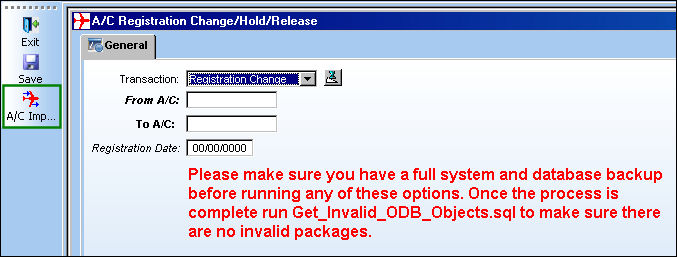
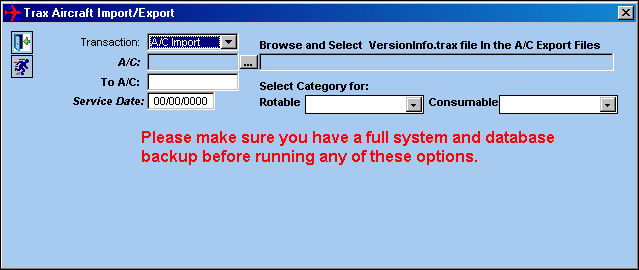
- Select 'A/C Import' in the Transaction Field.
- Click the Browse
 button in the A/C Field.
 - Browse to the folder that contains the .trax files (12 files).
The “A/C_information.trax” is the only file that will be viewable in this window although all 12 files are there.
- Select the “A/C_information.trax”.
The initial A/C Registration number will automatically be populated from the information contained in this file.
- Enter your new A/C Registration number in the To A/C Field.
- Enter the Service Date for the aircraft in the Service Date Field.
- Select the Run
 button.
A new aircraft is created in the Aircraft Master and the A/C Records are loaded into the TRAX System.
The following A/C records are imported into TRAX.
- A/C Master information.
- Installed component on the aircraft.
- Installed components P/N Control schedules.
- P/N A/C Effectivity to the tail number.
- P/N A/C Type/ Series Effectivity.
- P/N One Way Interchangeability.
- P/N Both Way Interchangeability.
- P/N for the P/N Master for Main part numbers, NLA part numbers and all Interchangeable part numbers.
- NLA part numbers for the NHA part number.
- A/C position for installation to the tail number
- A/C Type/ Series position for A/C installation.
- P/N Vendor/ Manufacturer for the Main, Interchangeable and NLA part numbers.
Engineering Records and Defect Reports are NOT part of the information that is imported.
Share
Print
|
©1997-2026 Trax USA Corp. All rights reserved. This manual may not be copied, photocopied, reproduced, translated, or converted to any electronic or machine-readable form, in whole or in part, without prior written approval from Trax USA Corp. |
 |