
 Share
Share
 Print
Print
|
|
|
|
|


Buyer Queue
The Buyer Queue filters for all open Requisitions that are either assigned to the logged-in user or meet the user's Buyer criteria as set up through the Employee Master, Buyer tab. The window can be filtered through various options. For more information, refer to the Buyer Queue Assignment Filter.
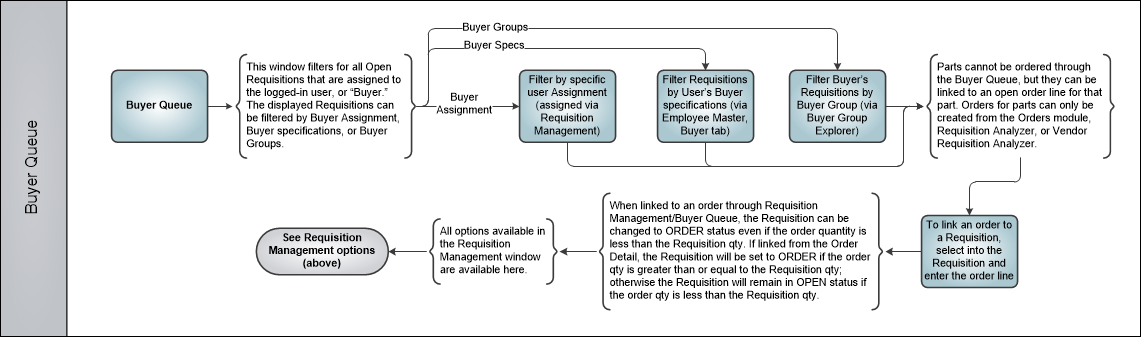
From this window, the options available are the same as those available in the Requisition Management window.
The following buttons are available:
- Notes Button
- Print Button
- Image Button
- Document Control Button
- Reset Button
- Inventory Query Button
- Requisition Analyzer Button
- Requisition Vendor Analyzer Button
- Quote Button

For example, the following User can view all Open Requisitions and all Requisitions that have been assigned to himself in their Buyer Queue:

For information regarding the above fields, refer to Requisition Management.
When a Requisition is selected, the following Requisition Management Detail window appears.
 Picklist and Requisition Process Flow
Share
Print
|
©1997-2026 Trax USA Corp. All rights reserved. This manual may not be copied, photocopied, reproduced, translated, or converted to any electronic or machine-readable form, in whole or in part, without prior written approval from Trax USA Corp. |
 |