
 Share
Share
 Print
Print
|
|
|
|
|


Requisition Authorization Explorer
The Requisition Authorization Explorer allows the user to review, reserve, accept, and/or reject Requisitions that have been released for authorization. The authorization process can be as simple as a one step authorization, or as complex as the user would like, such as a five or ten step authorization process. The actual authorization configuration process is user-defined based upon each users' individual business process needs, and can be set up via the Requisition Type System Transaction Code.
In order to use the Requisition Authorization Explorer, Switch  REQATHREL must be set to Yes. When set to Yes, an authorization will be required for all Requisitions initially created or revised. When set to No, authorization must be conducted through the Requisition Authorization window of the Update Menu.
Once a Requisition has been released for authorization via Requisition Management, go to the Requisition/ Explorer/ Requisition Authorization Explorer option.
If no Requisitions are currently awaiting authorization, or there are no Requisitions pending authorization that fit the users' criteria based upon the setup of the Requisition Type System Transaction Code, a message will appear.
When entering the Requisition Authorization Explorer window, the following screen is displayed:
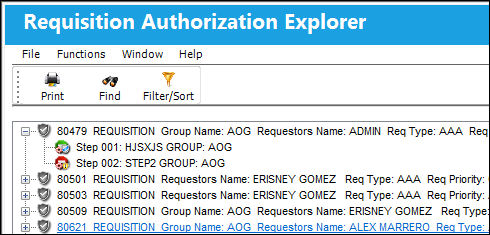
 The Requisitions that are displayed can be controlled through the Filter/Sort
  button.
Share
Print
|
©1997-2026 Trax USA Corp. All rights reserved. This manual may not be copied, photocopied, reproduced, translated, or converted to any electronic or machine-readable form, in whole or in part, without prior written approval from Trax USA Corp. |
 |