
 Share
Share
 Print
Print
|
|
|
|
|


Location Master, Optional Tab
From the Location Master, select the Optional Tab.
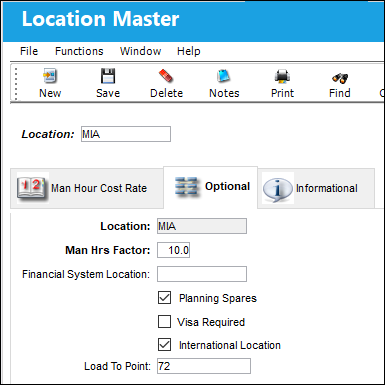
The following information/options are available in this window:
_____________________________________________________________________________________
Location
The Location for maintenance events, inventory stores, orders, transactions, or training events.
Man Hrs Factor
The number of Man Hours available for this location.
This field only appears when Planning switch  LBRBYHCNT is set to Yes.
Financial System Location
Financial System location code.
 Note: This field now allows 14 characters.
Planning Spares checkbox
When selected, the system will search for available parts in Inventory by location. This will appear in the A/C Planning Query. For additional information, refer to Part Status Indicator Button via A/C Planning Details which can be found in the Planning EVO Training manual.
Visa Required checkbox
Select this checkbox to indicate if a visa is required for the location.
International Location checkbox 
Select this checkbox to indicate that the location is an international location.
Load To Point
The number of Man Hours that are available at this location during the time frame specified in the Locations Load to Point button, via Interactive Planner. For additional information, refer to the Load to Point button, via the Interactive Planner.
_____________________________________________________________________________________
Share
Print
|
©1997-2026 Trax USA Corp. All rights reserved. This manual may not be copied, photocopied, reproduced, translated, or converted to any electronic or machine-readable form, in whole or in part, without prior written approval from Trax USA Corp. |
 |