
 Share
Share
 Print
Print
|
|
|
|
|


Location Master, Tax Info Tab
After selecting an existing or new record, click on the Tax Info Tab.
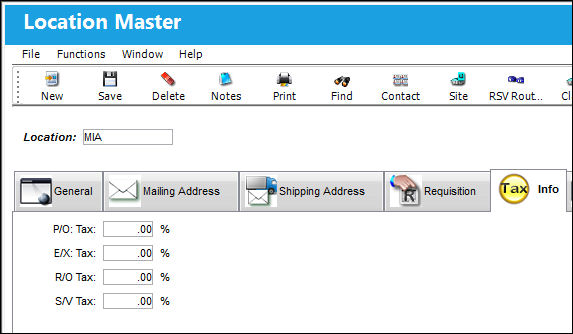
The Tax information presented here will be considered for all parts defined as “taxable” in the P/N Master.
The following information/options are available in this window:
_____________________________________________________________________________________
P/O: Tax
The tax percentage defaulted to a Purchase Order from the Location. For more information, refer to the Purchase Order Detail, General Tab.
E/X: Tax
The tax percentage defaulted to an Exchange Order with the Location. For more information, refer to the Exchange Order Detail, General Tab.
R/O: Tax
The tax percentage defaulted to a Repair Order from the Location. For more information, refer to the Repair Order Detail, General Tab.
S/V: Tax
The tax percentage defaulted to a Service Order from the Location. For more information, refer to the Service Order Detail, General Tab.
_____________________________________________________________________________________
Share
Print
|
©1997-2026 Trax USA Corp. All rights reserved. This manual may not be copied, photocopied, reproduced, translated, or converted to any electronic or machine-readable form, in whole or in part, without prior written approval from Trax USA Corp. |
 |