
 Share
Share
 Print
Print
|
|
|
|
|


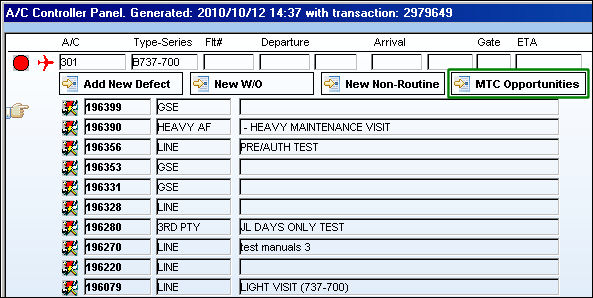
When a W/O is selected and the MTC Opportunities  button is selected a window will open up displaying the ground time required for MTC in the schedule. This window will also display the available ground time in between two flights at different locations (this available ground time is also know as Turn Time).
 This feature is ONLY applicable to certain customized Aircraft Controllers and therefore may not be available for your company. Customized interfacing properties are required for this functionality.
For example, from the A/C Controller Panel select a W/O and the MTC Opportunities button.
The MTC Opportunities window pops up as follows:
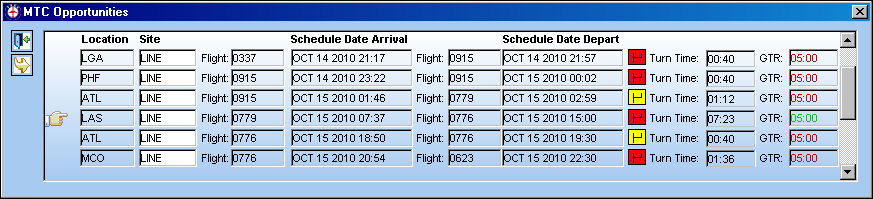
The following information/options are available in this window:
_____________________________________________________________________________________
Location
The Location for maintenance events, inventory stores, orders, transactions, or training events.
Site
The Site where the work is to be carried out (if applicable).
Flight (arrival)
The number of the flight that will be landing in the above location. This flight arrival marks the start of the Turn Time period.
Schedule Date Arrival
The scheduled arrival date and time for the arriving flight. This time marks the start of the Turn Time period.
Flight (departure)
The number of the flight that will be departing in the above location. This flight departure marks the ending of the Turn Time Period.
Schedule Date Depart
The scheduled departure date and time for the departing flight. This time marks the end of the Turn Time Period.
Part Status Indicator  icons
icons
The green status icon indicates that all spares required are available in inventory. The yellow status  icon indicates that some, but not all spares are available in inventory. The red status
  icon indicates that no spares are available in inventory. If no icon is displayed, parts are not required for the task.
Turn Time
The amount of time that an aircraft will be on ground in between scheduled flights at a given location. This field is composed of the time between the Schedule Date Arrival and the Schedule Date Departure. For example, notice the time between flights 0779 and 0776 for aircraft 301 at location LAS. The arrival time is 07:37 and the departure time is 15:00. This produces a Turn Time of 07:23 hours.
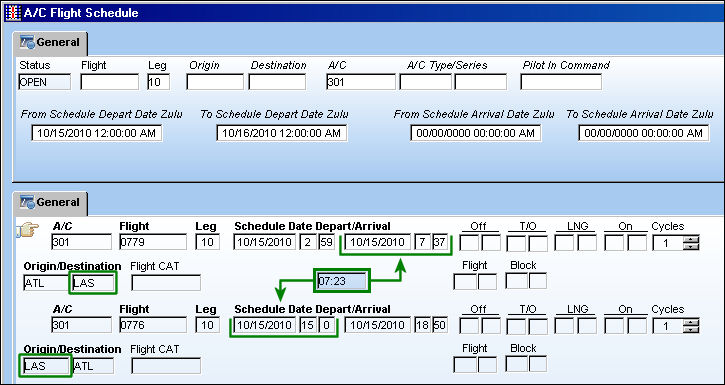
GTR
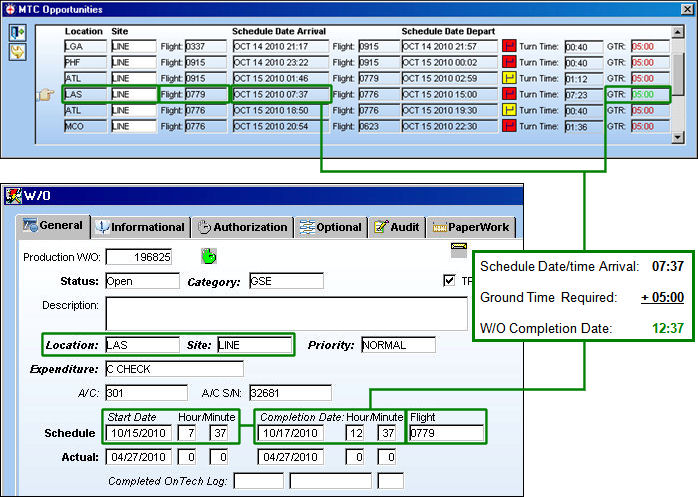
The Ground Time Required to complete the Work Order. This time is based on the amount of time between the W/O's schedule start date/time and the W/O's scheduled completion date/time. This number will be displayed in red if the GTR exceeds the Turn Time available at a location; the number will be displayed in green if the GTR fits within the Turn Time available at a location.
_____________________________________________________________________________________
Click the Select  button from the MTC Opportunities window to create a Work Order based on the information provided in the MTC Opportunities window. The information provided includes the Location, Site, Flight number, W/O Schedule Start Date/time and the W/O Schedule Completion Date/time. The W/O Schedule Start Date/time is based on the arrival flight date/time, and the Schedule Completion Date/time is based on the arrival flight date/time plus the GTR (Ground Time Required).
For information of creating new Work Orders for Defects in the Controller Panel window, refer to the New Work Order Button (MTC).
Share
Print
|
©1997-2026 Trax USA Corp. All rights reserved. This manual may not be copied, photocopied, reproduced, translated, or converted to any electronic or machine-readable form, in whole or in part, without prior written approval from Trax USA Corp. |
 |