|
TRAX MANUALS > Technical Records > Technical Records Module > Technical Records, Update Menu > A/C Controller Panel > A/C Controller Panel Buttons > MTC Opportunities Button, via the A/C Controller Panel
MTC Opportunities Button, via the A/C Controller Panel

The MTC Opportunities functionality improves the Technical Records/Update/A/C Controller Panel window by streamlining the process for creating and managing Work Orders for the daily operations of Aircraft Controllers. Modifications to the New W/O button and the addition of the MTC Opportunities button allow Controllers to create and modify Work Orders based on formulas that take into account the Ground Time Required (GTR), Turn Time, and other scheduling criteria.
Note: This feature is ONLY applicable to certain customized Aircraft Controllers and therefore may not be available for your company. Customized interfacing properties are required for this functionality.
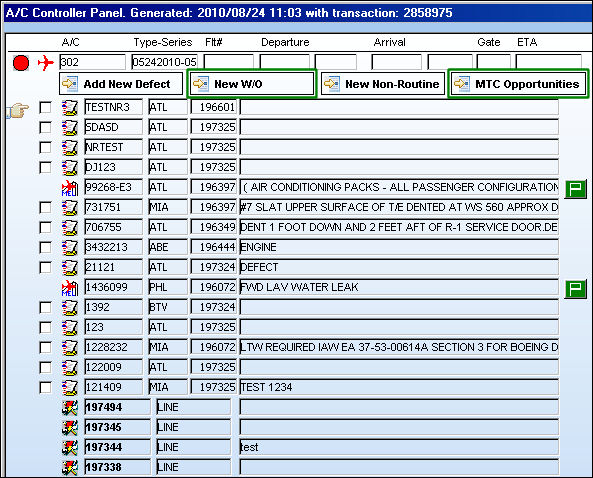
For detailed information refer to the New Work Order Button and the MTC Opportunities Button.
|
In This Section MTC Opportunities Button, via A/C Controller Panel Buttons MTC New Work Order Button, via A/C Controller Panel Buttons |
See Also A/C Controller Panel Buttons Reset Button, via the A/C Controller Panel Find Button, via the A/C Controller Panel History Button, via the A/C Controller Panel Filter/Sort Button, via the A/C Controller Panel Reminder/Alert Button, via the A/C Controller Panel Task Card Template Button, via the A/C Controller Panel A/C Units Button, via the A/C Controller Panel P/N APU Reading Button, via the A/C Controller Panel A/C Out Of Service Button, via the A/C Controller Panel Add New Defect Button, via the A/C Controller Panel New Work Order Button, via the A/C Controller Panel Quick Entry Button, via the A/C Controller Panel Oil Consumption Button, via the A/C Controller Panel History Button, via the A/C Controller Panel Damage Chart Button, via the A/C Controller Panel Plan EC Button, via the A/C Controller Panel New Non-Routine Button, via the A/C Controller Panel Requisition Button, via the A/C Controller Panel Most Due Date Button, via the A/C Controller Panel |
|