|
TRAX MANUALS > Technical Records > Technical Records Module > Technical Records, Update Menu > A/C Controller Panel > A/C Controller Panel Buttons > History Button, via the A/C Controller Panel
History Button, via the A/C Controller Panel
The History  button allows the user to see historical A/C Controller Panel record information for the selected aircraft in query mode. Select the History button. TRAX displays the Defect Reports window: button allows the user to see historical A/C Controller Panel record information for the selected aircraft in query mode. Select the History button. TRAX displays the Defect Reports window:
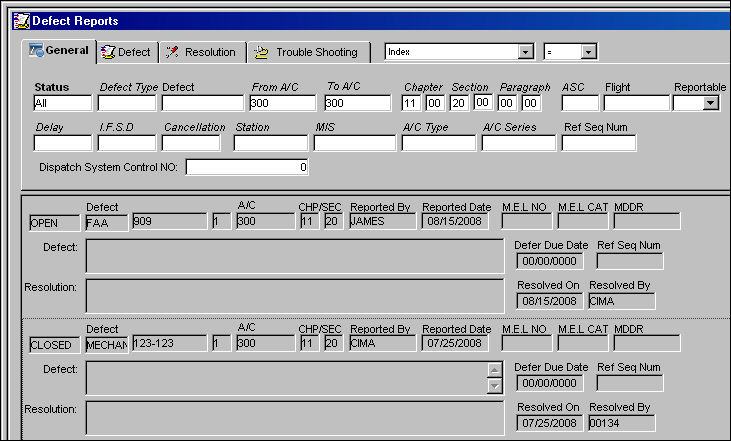
Note: TRAX displays all historical (defect) reports for the selected A/C and chapter/section for the defect report selected.
|
See Also A/C Controller Panel Buttons Reset Button, via the A/C Controller Panel Find Button, via the A/C Controller Panel Filter/Sort Button, via the A/C Controller Panel Reminder/Alert Button, via the A/C Controller Panel Task Card Template Button, via the A/C Controller Panel A/C Units Button, via the A/C Controller Panel P/N APU Reading Button, via the A/C Controller Panel A/C Out Of Service Button, via the A/C Controller Panel Add New Defect Button, via the A/C Controller Panel New Work Order Button, via the A/C Controller Panel Quick Entry Button, via the A/C Controller Panel Oil Consumption Button, via the A/C Controller Panel History Button, via the A/C Controller Panel Damage Chart Button, via the A/C Controller Panel Plan EC Button, via the A/C Controller Panel New Non-Routine Button, via the A/C Controller Panel Requisition Button, via the A/C Controller Panel Most Due Date Button, via the A/C Controller Panel MTC Opportunities Button, via the A/C Controller Panel |
|

 Share
Share
 Print
Print


