
 Share
Share
 Print
Print
|
|
|
|
|


Select the New Work Order  button to add the selected record (Defect) to a Work Order for the aircraft. For additional information, refer to Work Order Header via Work Orders of the Production Training Manual. The only difference is that the A/C Out of Service is added to the Work Order window in the A/C Controller Panel option.
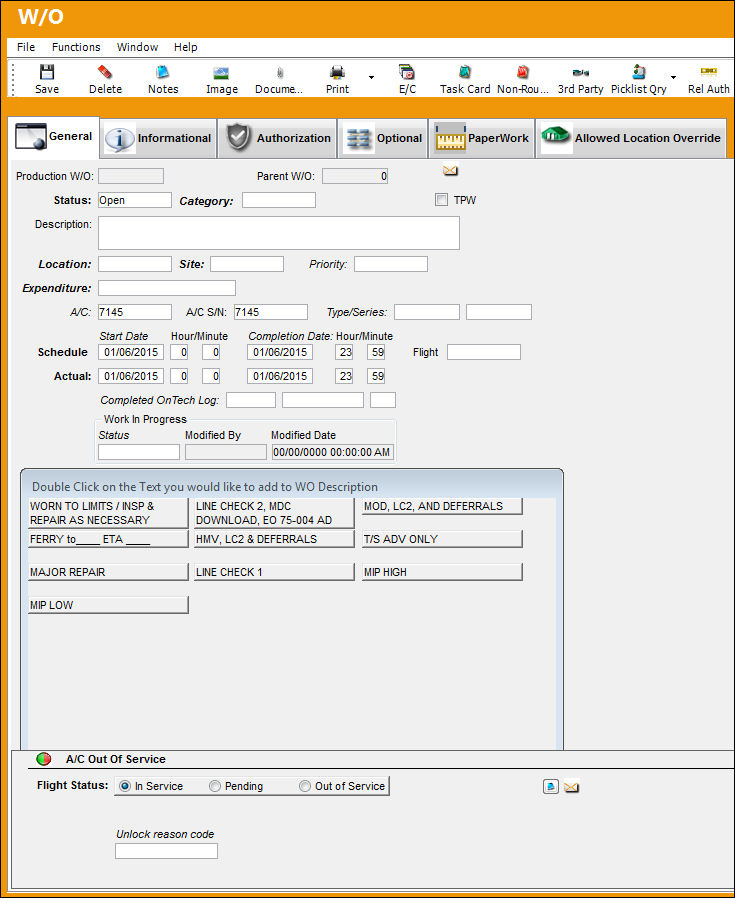
When creating a new Work Order with the New Work Order  button, some fields will be populated by default (A/C, A/C/S/N, Start Schedule and Actual Dates and Completion Schedule and Actual Dates.
Once the Work Order is created, for planning purposes, users can be sent System Notifications when a Production Work Order schedule date or time is changed. For more information refer to the Production W/O Schedule Date/Time Change via the Settings Training Manual.
The following information/options are available in this window:
_____________________________________________________________________________________
Flight Status
The current flight status of the A/C will appear. When creating a new Defect Report, the default Flight Status is 'Out Of Service.'
In Service radio button - Choose this radio button to place the aircraft in service and ready to fly. This is selected when all Defects have been resolved or deferred. The Green  light will appear for this aircraft in the A/C Controller Panel.
Pending radio button - Choose this radio button if the aircraft status is pending review of any related Defect Reports. This is selected when all Defects are in pending status. The Yellow  light will appear for this aircraft in the A/C Controller Panel.
Out of Service - Choose this radio button to place the aircraft out of service and unable to fly. This is selected when the Aircraft is out of service due to a Defect. The Red  light will appear for this aircraft in the A/C Controller Panel.
Control No
A control reference number that is auto generated. This number is informational only.
Notes  button
Select the Notes button to enter any notes that will be associated to the currently selected item. For additional information regarding the Notes Button, refer to Notes Button, via Standard Buttons which can be found in the System Standards Training manual.
W/O
The Work Order used to categorize, manage, and schedule work requirements for aircraft maintenance.
Hold Boarding checkbox
Check to indicate that boarding of the aircraft should be “On Hold."
Revision
The new revision number.
Advised
The date and time that the discrepancy was reported. The default is the time that the Defect Report is being created and can be edited as required.
Out Of Service
The date and time that the aircraft went out of service for maintenance. If the Advised time is less than the Out Of Service time, then the Advised time equals the current time. If the Advised time is greater than the Estimated In Service time, then the Advised time equals the Out Of Service time.
Estimated In Service
The estimated date and time that the aircraft will be back in service.
Update checkbox
When selected the estimated in-service title will change to "update." This is used to specify a time in which further information will be available on the status of the A/C.
Type
The type of 'Out of Service' record used by customers with a Third Party interface.
Confidence Level
This field is used by customers with a Third Party interface.
Unlock Reason Code
This field allows users to select a reason code when the aircraft is placed 'in service' manually. This field is only available when the aircraft is in service. Therefore, the In Service radio button must be selected. This is an informational-only field and is accessible through any window where the A/C Out of Service window is accessible. This field is based off of System Transaction Code Technical Records/Unlock Reason A/C CP OOS. This field is only available when Technical Records Switch  URACCPOOS is set to Yes. For more information refer to Switch URACCPOOS via the Technical Records Switches Manual.
_____________________________________________________________________________________
Once a work Order goes to 'Completed' status, the A/C will be automatically placed to 'In service' status.
Share
Print
|
©1997-2026 Trax USA Corp. All rights reserved. This manual may not be copied, photocopied, reproduced, translated, or converted to any electronic or machine-readable form, in whole or in part, without prior written approval from Trax USA Corp. |
 |