|
TRAX MANUALS > Technical Records > Technical Records Module > Technical Records, Update Menu > A/C Controller Panel > A/C Controller Panel Buttons > History Button, via the A/C Controller Panel
History Button, via the A/C Controller Panel
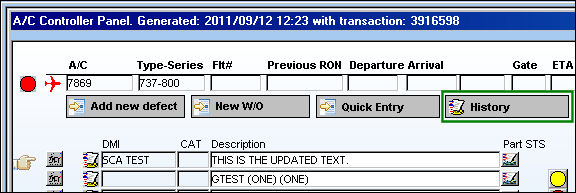
The History  button allows the user to access the Defect Query window to quickly search for all Defects associated to the specified aircraft. button allows the user to access the Defect Query window to quickly search for all Defects associated to the specified aircraft.
 This feature is ONLY applicable to certain customized Aircraft Controllers and therefore may not be available for your company. This feature is ONLY applicable to certain customized Aircraft Controllers and therefore may not be available for your company.
From the A/C Controller Panel, select the History button:
TRAX displays the Defect Reports Query window:
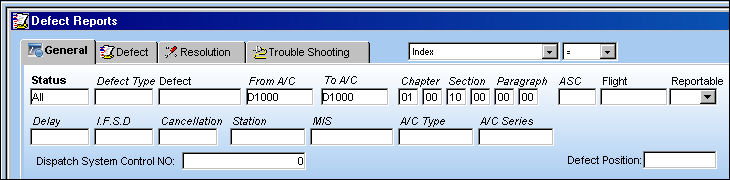
For additional information, refer to the Defect Report Query, via the Query Menu of the Technical Records Training Manual.
|
See Also A/C Controller Panel Buttons Reset Button, via the A/C Controller Panel Find Button, via the A/C Controller Panel History Button, via the A/C Controller Panel Filter/Sort Button, via the A/C Controller Panel Reminder/Alert Button, via the A/C Controller Panel Task Card Template Button, via the A/C Controller Panel A/C Units Button, via the A/C Controller Panel P/N APU Reading Button, via the A/C Controller Panel A/C Out Of Service Button, via the A/C Controller Panel Add New Defect Button, via the A/C Controller Panel New Work Order Button, via the A/C Controller Panel Quick Entry Button, via the A/C Controller Panel Oil Consumption Button, via the A/C Controller Panel Damage Chart Button, via the A/C Controller Panel Plan EC Button, via the A/C Controller Panel New Non-Routine Button, via the A/C Controller Panel Requisition Button, via the A/C Controller Panel Most Due Date Button, via the A/C Controller Panel MTC Opportunities Button, via the A/C Controller Panel |
|

 Share
Share
 Print
Print


