|
TRAX MANUALS > Technical Records > Technical Records Module > Technical Records, Update Menu > A/C Controller Panel > A/C Controller Panel Buttons > Quick Entry Button, via the A/C Controller Panel
Quick Entry Button, via the A/C Controller Panel
The Quick Entry buttons allow users to create and/or update Defect Report information without out exiting the A/C Controller Panel window.
 These buttons are customer specific and require unique interfacing properties. For more information refer to a TRAX administrator. These buttons are customer specific and require unique interfacing properties. For more information refer to a TRAX administrator.
The buttons are available in the A/C Controller Panel as follows:
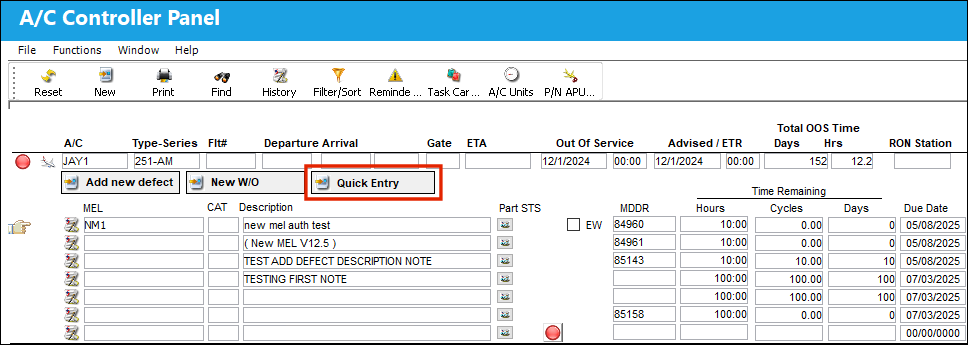
 These buttons are security controlled via Technical Records/Update/A/C Controller Panel/Defect Report Quick Entry. For more information refer to the Security Explorer via the Technical Records Training Manual. These buttons are security controlled via Technical Records/Update/A/C Controller Panel/Defect Report Quick Entry. For more information refer to the Security Explorer via the Technical Records Training Manual.
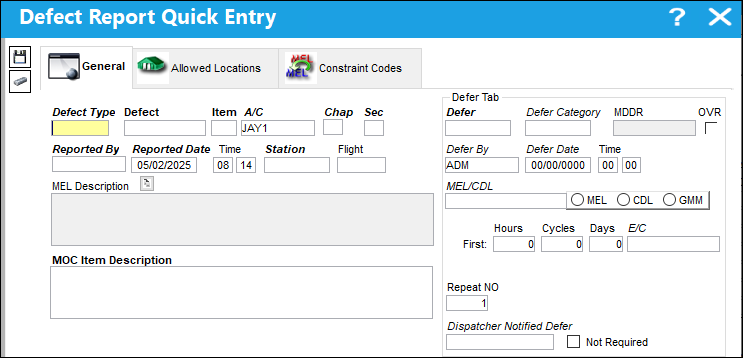
The Quick Entry  button at the top of the window allows users to enter new Defect Reports that can be view from the Defect Report window. When the button is selected the following window appears: button at the top of the window allows users to enter new Defect Reports that can be view from the Defect Report window. When the button is selected the following window appears:
|
In This Section Quick Entry Button, General Tab, via the A/C Controller Panel Quick Entry Button, Allowed Location Tab, via Quick Entry Button Quick Entry Button, Constraint Codes Tab, via Quick Entry Button |
See Also A/C Controller Panel Buttons Reset Button, via the A/C Controller Panel Find Button, via the A/C Controller Panel History Button, via the A/C Controller Panel Filter/Sort Button, via the A/C Controller Panel Reminder/Alert Button, via the A/C Controller Panel Task Card Template Button, via the A/C Controller Panel A/C Units Button, via the A/C Controller Panel P/N APU Reading Button, via the A/C Controller Panel A/C Out Of Service Button, via the A/C Controller Panel Add New Defect Button, via the A/C Controller Panel New Work Order Button, via the A/C Controller Panel Oil Consumption Button, via the A/C Controller Panel History Button, via the A/C Controller Panel Damage Chart Button, via the A/C Controller Panel Plan EC Button, via the A/C Controller Panel New Non-Routine Button, via the A/C Controller Panel Requisition Button, via the A/C Controller Panel Most Due Date Button, via the A/C Controller Panel MTC Opportunities Button, via the A/C Controller Panel |
|

 Share
Share
 Print
Print


