
 Share
Share
 Print
Print
|
|
|
|
|


The Constraint Codes Tab details all Constraint Codes currently associated with the Defect. If a Constrained MEL is associated with a Defect, its Constraint Codes will populate this tab. Users can also manually add Constraint Codes using the New  button. For more information on adding Constraint Codes, refer to MEL Master, Constraints Tab via the Settings Module.
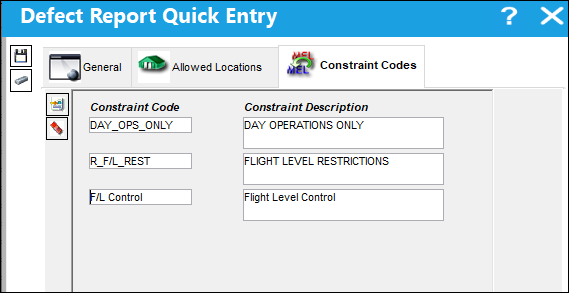
 Note: Constraint Codes that are added using the Quick Entry button will be updated and reflected in the MEL Master.
The following information/options are available in this window:
_____________________________________________________________________________________
Constraint Code
The Constraint Code specifies the code that is predefined in your System Transaction Code. Each code refers to a type of constraint that can be applied for maintenance purposes. For more information, refer to the Technical Records Transaction Codes manual.
Constraint Description
The description of the applicable Constraint.
_____________________________________________________________________________________
Share
Print
|
©1997-2026 Trax USA Corp. All rights reserved. This manual may not be copied, photocopied, reproduced, translated, or converted to any electronic or machine-readable form, in whole or in part, without prior written approval from Trax USA Corp. |
 |