
 Share
Share
 Print
Print
|
|
|
|
|


The Overall Service  button allows the user to view an overall service calculation for all rotable P/Ns that are effective to a specified Type-Series. This window works the same was as the Inventory Optimization (Rotable), Optimization tab; the only difference is that the Inventory Optimization (Rotable), Optimization tab displays information pertaining to one P/N, while the Overall Service window displays results for all P/Ns effective to a Type-Series selected by the user.
From the Inventory Optimization (Rotable) window, select the Overall Service button.
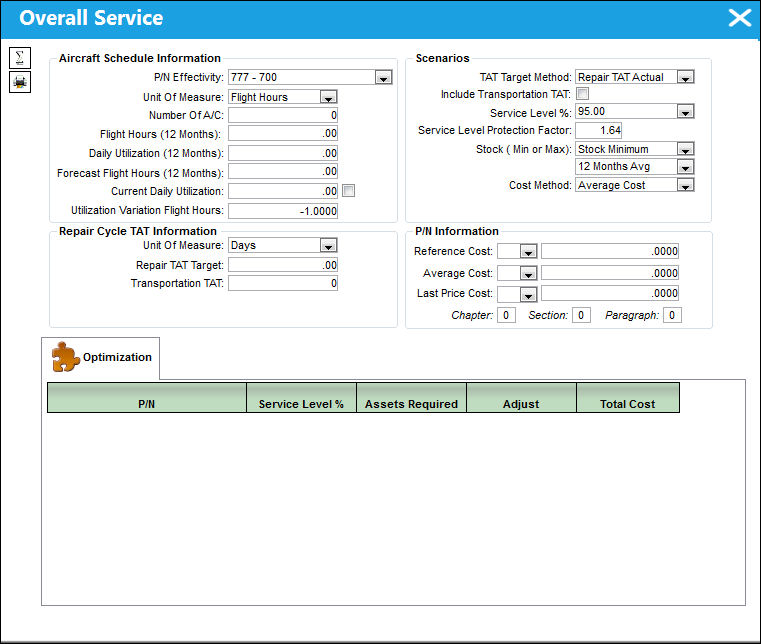
TRAX displays the Overall Service window:
From the Overall Service window, select a P/N Effectivity from the drop down menu. Populate all desired information and select the Calculate  button.
The results of the Overall Service calculation appear in the Optimization tab as shown below.
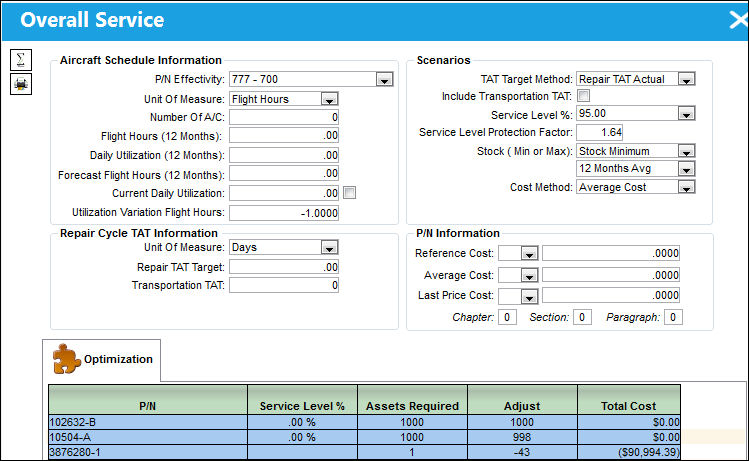
The user may manipulate the data in this window to re-calculate the Overall Service results multiple times until the desired results are attained.
Select the Print  button to print the above results.
For information regarding the above fields and checkboxes, refer to the Inventory Optimization (Rotable), Optimization Tab, via Inventory Optimization (Rotable) of the Inventory Training Manual.
Share
Print
|
©1997-2026 Trax USA Corp. All rights reserved. This manual may not be copied, photocopied, reproduced, translated, or converted to any electronic or machine-readable form, in whole or in part, without prior written approval from Trax USA Corp. |
 |