
 Share
Share
 Print
Print
|
|
|
|
|


The Request Status  button is available in the Exchange Order, Repair Order and Purchase Order, General tabs and allows users to view the current status of the order from TRX. The TRX Status window links to the TRX database and allows users to view and keep track of the current progress of the transaction.
 This button is part of the TRX interface functionality and is only available for customers using this interface. For more information refer to the TRX Interface (TCS) manual.
When selected the following informational window pops up:
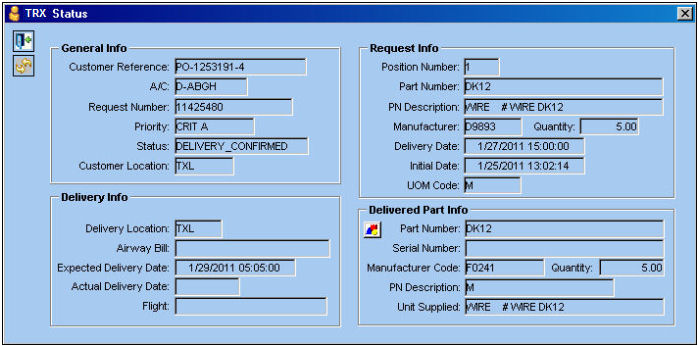
Much information displayed in this window is specific to the TRX interface functionality and cannot necessarily be found within the TRAX database.
TRX Status window buttons:
- The View Interchangeability Documents
 button displays any documents attached to the component regarding its interchangeability.
 - The View Shipping Documents
 button displays related shipping documents such as the airway bill. This button is only available once the order has been shipped to the Customer by TRX.
 - The View Component Documents
 button displays any documents attached to the component Serial Number regarding this order.
Share
Print
|
©1997-2026 Trax USA Corp. All rights reserved. This manual may not be copied, photocopied, reproduced, translated, or converted to any electronic or machine-readable form, in whole or in part, without prior written approval from Trax USA Corp. |
 |