
 Share
Share
 Print
Print
|
|
|
|
|


Physical Inventory Count Print
Inventory/ Print/ Physical Inventory Count Print
A report will be generated, showing all items matching the filter settings selected. Serialized items will be included with their serial number. The generated print will display as follows:
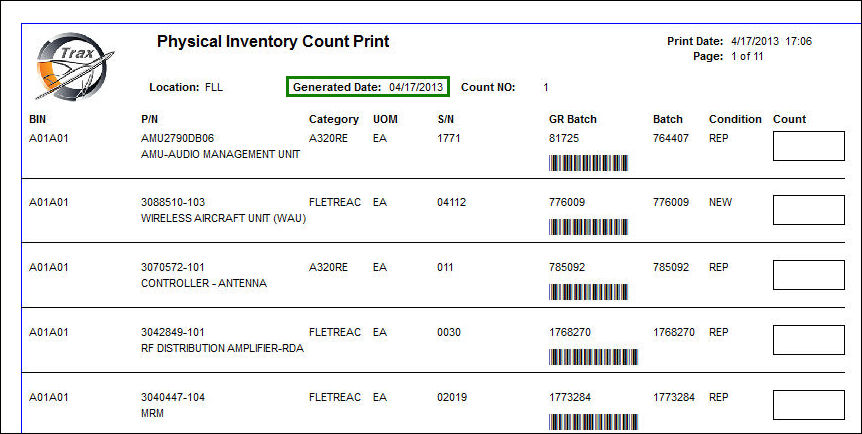
Note: The Count column to the right. Once the report is printed, this column can be used to enter the quantity that is actually counted during the Physical Inventory Count step explained in the following section. For more information go to Physical Inventory Count.
Note: This is a customizable print. The above example is the TRAX standard Physical Inventory Count Print.
Physical Inventory Global Count Print
The Physical Inventory Count Print displays a count for all locations. The print displays parts with a status of pending inventory, pending technical records, pending repair, and on Transfer Orders.
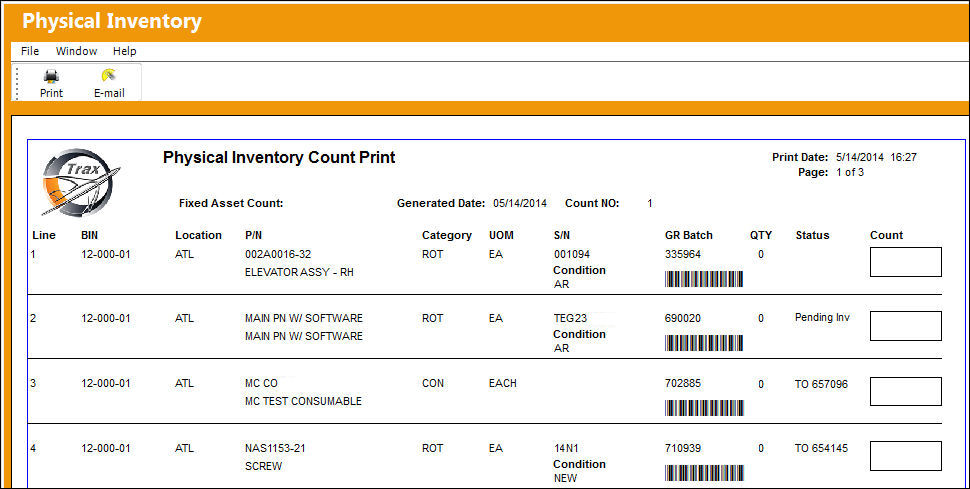
You can re-print the count report if you require (Inventory/ Print/ Physical Inventory Print/ Physical Inventory Print format).
Share
Print
|
©1997-2026 Trax USA Corp. All rights reserved. This manual may not be copied, photocopied, reproduced, translated, or converted to any electronic or machine-readable form, in whole or in part, without prior written approval from Trax USA Corp. |
 |