
 Share
Share
 Print
Print
|
|
|
|
|


Adding to an existing count
Inventory/ Update/ Physical Inventory Generation
Users have the option to run multiple counts within the same location on the same generated date or later dates prior to closing the Physical Inventory Count.
In the Physical Inventory Count Generation window, populate the desired information by using the filter criteria.
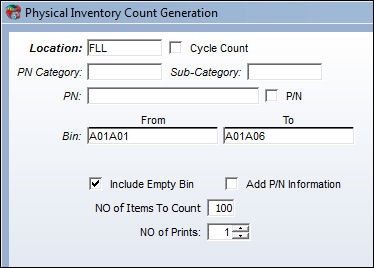
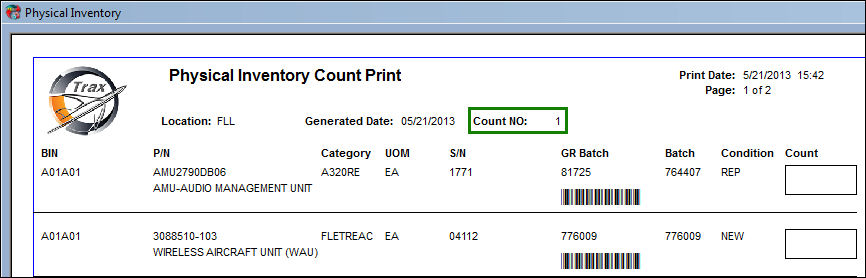
The Physical Inventory Count Print is generated with a Count number of 1.
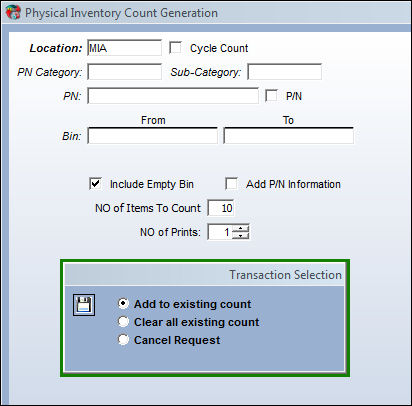
Now, a different user may generate a count for the same location on the same day.
Only one generation can be run per day per location per user.
Once the Save  button is selected, the system will prompt user 2 with the Transaction Selection pop- up which will allow you to add to the existing count.
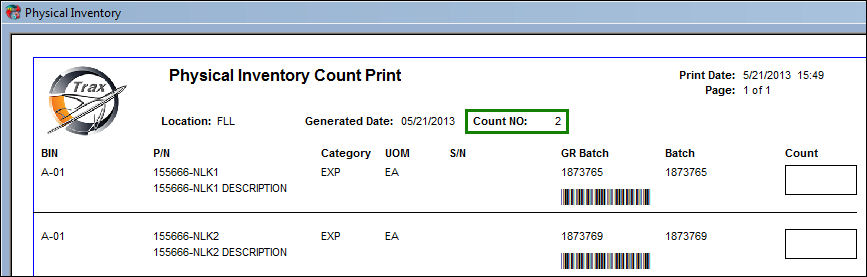
The Physical Inventory Count Print will display and the Count Number will list 2. This is due to the amount of times the generation has been ran for that specific location through a new user. This number will continue to increase (+) the number of times new users generate a count for the same location prior to closing or reconciling the Physical Inventory Count.
When the Include Empty Bin checkbox is selected the Physical Inventory Count Print displays the information the following way:
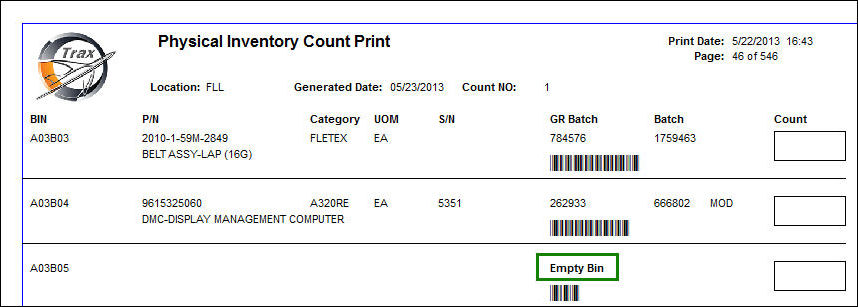
Note: This is a customizable print. The above example is the TRAX standard Physical Inventory Count Print.
Share
Print
|
©1997-2026 Trax USA Corp. All rights reserved. This manual may not be copied, photocopied, reproduced, translated, or converted to any electronic or machine-readable form, in whole or in part, without prior written approval from Trax USA Corp. |
 |