
 Share
Share
 Print
Print
|
|
|
|
|


Physical Inventory Adjustment
Inventory/ Update/ Physical Inventory Adjustment
After performing the Physical Inventory Generation, the Physical Inventory Count, and the Physical Reconciliation Recount (if applicable), it is required that you run the Physical Inventory Adjustment to have the system update the records and accept the counted quantities.
Note: Refer to switch  CONSTRCNT for additional information regarding part movements after a Physical Inventory Count is generated.
Note: INVCNT0B - Delete Batches With Zero (0) Quantity On Physical Inventory Count Adjustment. When set to Yes, TRAX will delete batches with a ZERO quantity after an inventory adjustment.
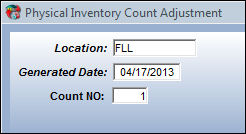
Enter/Update the following information:
Field |
Function |
Location |
Enter the location of where the physical counting took place. |
Generated Date |
Enter the date the Physical Inventory Count Print was generated. |
Count NO |
Enter the count number for the amount of items that are to be counted. Different users can enter different count numbers for P/Ns within the same location simultaneously. |
Note: Do not save/perform this step more than once! If this step is saved more than once, counts will be adjusted again based on the previously entered count information (i.e. amounts will be doubled). Having completed the Physical Inventory generation setup, do NOT run the Physical Inventory Adjustment without entering the Physical Inventory counts, this will cause TRAX to automatically set all non-serialized items to zero.
A report will be generated if discrepancies were found.
Were discrepancies found for serialized parts?
If Yes, then locate the missing parts and manually adjust the discrepancy. It is common practice to separate the missing parts by performing a Bin/Warehouse Transfer. Go to Bin/Warehouse Transfer.
If No, then the part history and financial records will be written when the Physical Inventory is run. Go to Journal Entries for additional information.
Note: TRAX will automatically adjust the quantity of all items and print a report of all serialized items that had differences. If discrepancies are found, you must investigate and then use your organization's protocol (e.g. scrap or issue) for the parts to make the adjustment, the system will automatically adjust quantities to solve the matter.
Share
Print
|
©1997-2026 Trax USA Corp. All rights reserved. This manual may not be copied, photocopied, reproduced, translated, or converted to any electronic or machine-readable form, in whole or in part, without prior written approval from Trax USA Corp. |
 |