
 Share
Share
 Print
Print
|
|
|
|
|


Physical Reconciliation Recount
Inventory/ Update/ Physical Reconciliation Recount
The Physical Count Generation and the Physical Inventory Count must be performed prior to performing the Physical Reconciliation Recount if applicable.
In order to use this option, the Recount checkbox must be selected in the Physical Inventory Count window. By selecting this checkbox, that specific record will have the option available for a reconciliation count and you can re-enter counts for specific items.
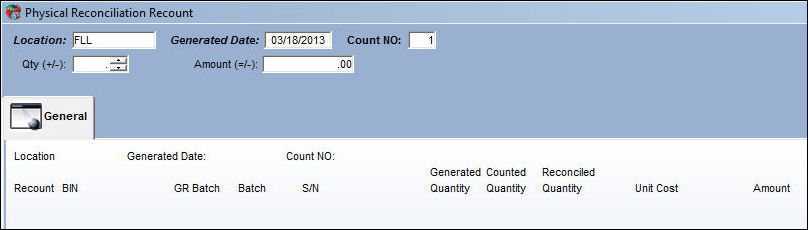
Enter the following search-related information:
Field |
Function |
Location |
The location where the physical count was done. |
Generated Date |
The date of when the Physical Inventory Count was performed. |
Count NO |
Enter the count number for the amount of items that are to be counted. Different users can simultaneously enter different count numbers for P/Ns within the same location. |
Qty (+/-) |
Enter the variant value to locate records that contain a specific count quantity. Positive and Negative values are allowed. |
Amount (=/-) |
Enter the dollar amount to locate records that contain a specific dollar amount. The search can filter for less than and/or equal to your entered dollar value. |
Select the Find  button to retrieve the data.
Share
Print
|
©1997-2026 Trax USA Corp. All rights reserved. This manual may not be copied, photocopied, reproduced, translated, or converted to any electronic or machine-readable form, in whole or in part, without prior written approval from Trax USA Corp. |
 |