
 Share
Share
 Print
Print
|
|
|
|
|


Recount checkbox, via Physical Reconconciliation Recount
Inventory/ Update/ Physical Reconciliation Recount
Select the Recount checkbox for the records that you wish to correct (e.g. the counted quantities). You can individually select records or use the Select All  button to select all records. Select the Save
  button to save all information.
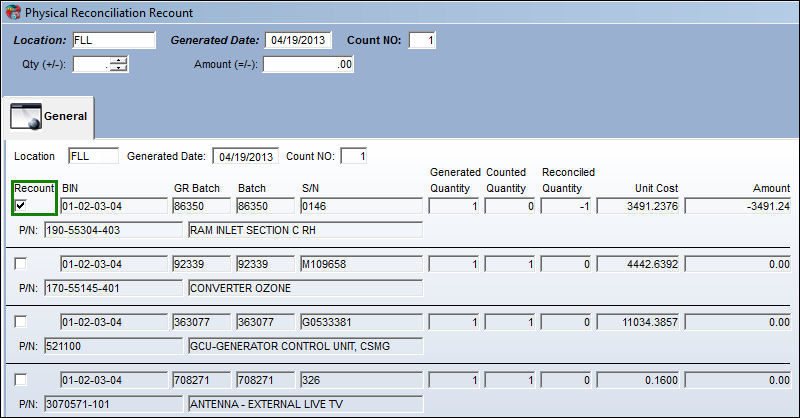
The Generated, Counted, and Reconciled columns are described below:
• The Generated Quantity represents the quantity calculated by TRAX.
• The Counted Quantity represents the actual manual count of the designated inventory.
• The Reconciled Quantity represents the quantity calculated by TRAX versus the manual count of the inventory. If discrepancies are present the Reconciled Quantity will display the difference with positive or negative (+,-) values.
• The Unit Cost column represents the cost of the part.
• The Amount column represents the unit cost if the part is lost.
Note: If the missing part is a serialized part, then the system will not show the part as missing since this will affect finances.
Share
Print
|
©1997-2026 Trax USA Corp. All rights reserved. This manual may not be copied, photocopied, reproduced, translated, or converted to any electronic or machine-readable form, in whole or in part, without prior written approval from Trax USA Corp. |
 |