
 Share
Share
 Print
Print
|
|
|
|
|


Setup a Customer’s Inventory Owner
In the Customer Master, set up the Customer Inventory relationship as follows:
- Go to Settings / Update / Customer (General Tab).
- Right click over the Customer field and select a Customer from the pop-up window.
- Click on the Find
 button.
 - In the Inventory Owner Field select an Owner.
- Click on the Save
 button.
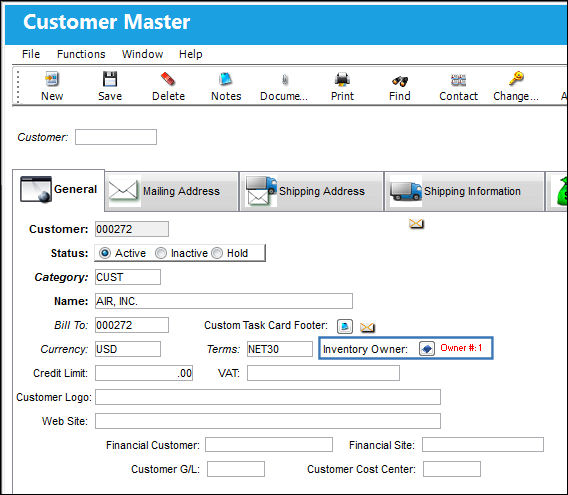
TRAX saves the Customer Master information that now includes the specified Inventory Owner.
Share
Print
|
©1997-2026 Trax USA Corp. All rights reserved. This manual may not be copied, photocopied, reproduced, translated, or converted to any electronic or machine-readable form, in whole or in part, without prior written approval from Trax USA Corp. |
 |