
 Share
Share
 Print
Print
|
|
|
|
|


Using Managed Parts on a Work Order
Managed parts can only be issued to a Third Party W/O for aircraft of that particular customer.
Issue the managed part to a Third Party W/O as follows:
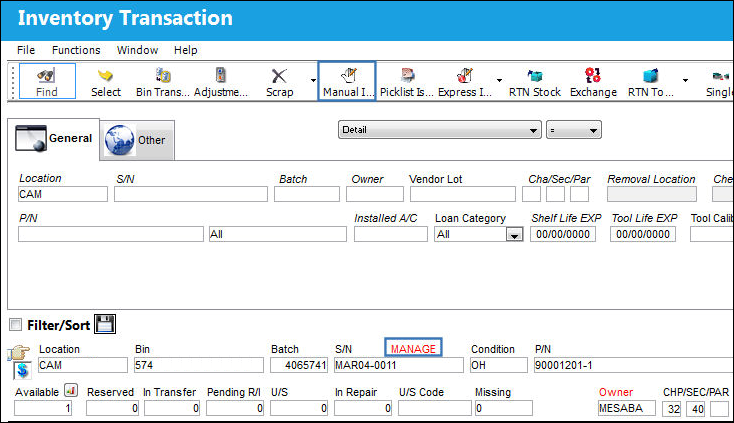
From Inventory Transaction find the managed part and click the Manual Issue  button.
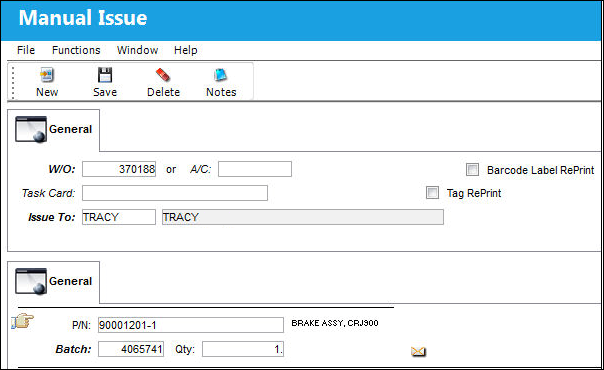
Select a Third Party W/O for the customer’s aircraft and save.
The Manual Issue Print appears.
The part will no longer be in Inventory because it has been issued to the Third Party Work Order.
A Third Party W/O will have a sales order associated with it and this managed part will automatically be added to the Order and removed from your inventory when the W/O is closed.
When performing a Remove/Install A/C P/N Transaction and installing a One Way Forward managed P/N on to a managed A/C:
1. Journal Entries are not created for the managed P/N.
2. Fixed Assets Registries are not affected for the managed P/N.
3. The P/N Average Cost is not adjusted.
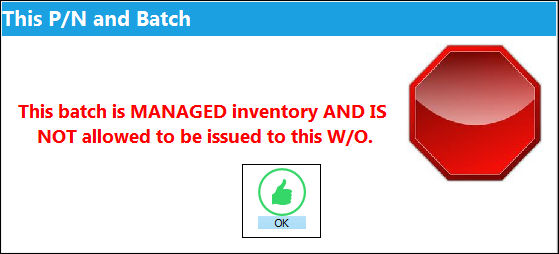
If the managed part is issued to a Third Party W/O for a customer’s aircraft where the Inventory Owner for that Customer does not match the Owner of the managed part, the system will give a warning message and the part cannot be issued to that W/O.
Share
Print
|
©1997-2026 Trax USA Corp. All rights reserved. This manual may not be copied, photocopied, reproduced, translated, or converted to any electronic or machine-readable form, in whole or in part, without prior written approval from Trax USA Corp. |
 |