
 Share
Share
 Print
Print
|
|
|
|
|


Order Detail Area, via Orders Navigator

The Order Detail Area displays all line items per order. This window allows the user to add additional line items to an order without having to navigate back and forth between the Order Header window.
From the Order Detail, select the New  button:

The following information/options are available in this window:
_____________________________________________________________________________________
Line
The specific Line item of the Order. Each Line item could represent a different part included in the same order.
P/N
The Part Number reference for the aircraft part.
UOM
The unit of measure. This will default if associated with a Part Number as defined in the P/N Master. Transactions for parts can be conducted in a different UOM than defined in the P/N Master. However, upon receiving the UOM, conversion will automatically adjust the quantities, providing that the conversion rate is defined in the UOM System Transaction Code (via Setting/Explorer/System Transaction Code).
DEL Date
The date when the part(s) is/are expected to be received.
Qty
The number of parts for the transaction.
Condition
The condition of the part.
P/N Description
The description of the part. This may be overridden against the order.
A/C
The individual aircraft tail number.
Requisition
List of required parts for either a maintenance item or for restocking. The Requisition linked to the order. When the Requisition and Line are populated, most of the order line's fields are auto-populated based on the information listed in the Requisition (including the P/N). Requisitions may be configured to be mandatory by Order Type. For additional information please refer System Configuration Training Manual.
The system will check the Authorization Status of the Requisition when being attached to the order. If authorization is required, the Requisition Authorization option must be used by someone with the relevant financial authority. Once the Requisition is authorized, users will be able to attach the document to the order. For additional information, please refer to the Requisition Training Manual.
Line - The attached requisition line number.
G/L
The General Ledger accounting code for the order. The order G/L will default to the Part Number G/L as defined in the P/N Master, Costing tab. However, this field may be overwritten for any given order.
Status
Line item will default to Open status; Order statuses are as follows:
Cancel - Order is not to be processed, received, or invoiced.
Closed - All Order line items have been received. The status will automatically change to Closed status.
Open - All Order items have not yet been received. Open defaults for all newly created order line items.
_____________________________________________________________________________________
The following fields become available for Line item 2:
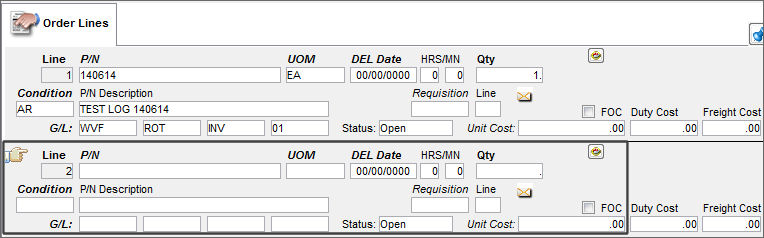
Populate all Line information and save the record.
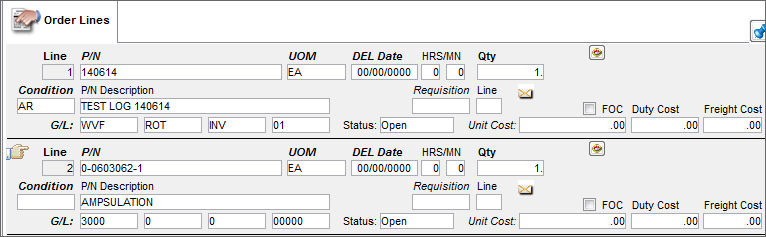
The user may select the Delete  button to delete any line items.
For additional information regarding the fields, buttons and tabs in the Order Detail window, refer to the Detail tabs via Contract Order of the Orders Training Manual.
Share
Print
|
©1997-2026 Trax USA Corp. All rights reserved. This manual may not be copied, photocopied, reproduced, translated, or converted to any electronic or machine-readable form, in whole or in part, without prior written approval from Trax USA Corp. |
 |