
 Share
Share
 Print
Print
|
|
|
|
|


A/C Status Print
The A/C Status Report will display a list of all ADs and SBs on the aircraft and the Schedule Hours information for each A/C E/C.
In the A/C Component Print window, select the A/C Status Report. Enter the A/C in the A/C field and select the Find  button.
All fields, with the exception of P/N and S/N, are greyed out and not editable. Certain fields will become available and controls will be selected depending on the report required.
The following is one example of a print option that may be used. Use of other prints is determined by the the lease or sales agreement.
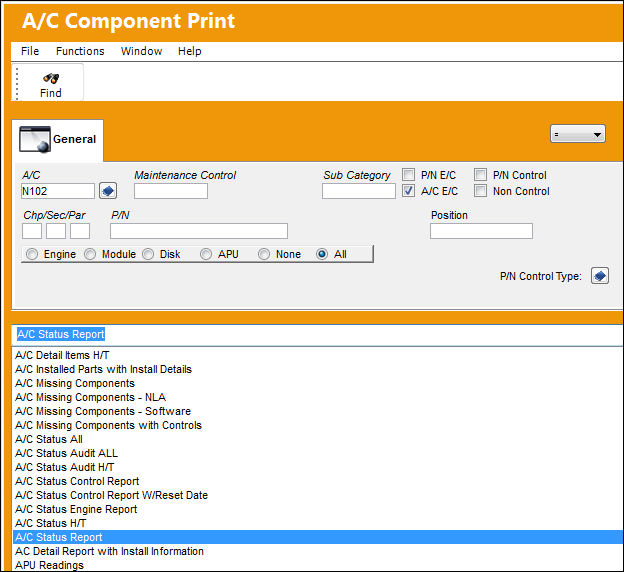
The Aircraft Status Report will display with all A/C E/Cs and detailed Schedule Hours information.
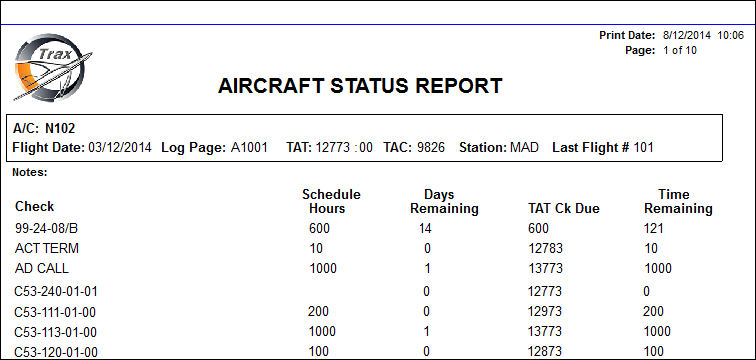
This is a customizable print. The above example is the TRAX standard Aircraft Status Report.
Share
Print
|
©1997-2026 Trax USA Corp. All rights reserved. This manual may not be copied, photocopied, reproduced, translated, or converted to any electronic or machine-readable form, in whole or in part, without prior written approval from Trax USA Corp. |
 |