
 Share
Share
 Print
Print
|
|
|
|
|


A/C Component Print
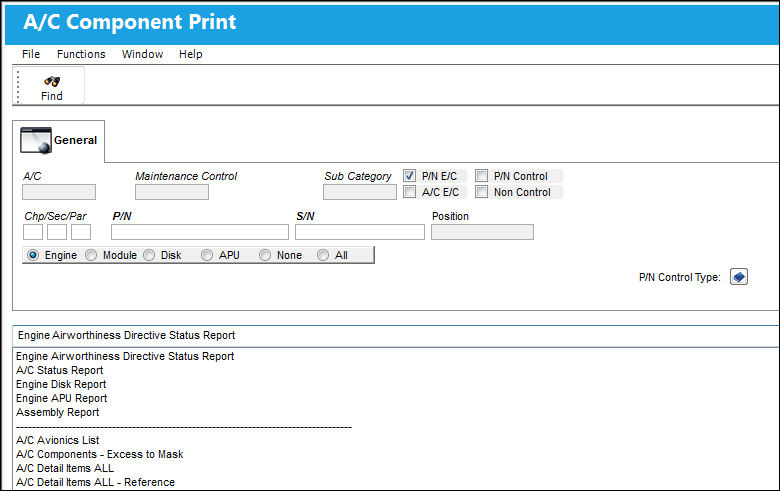
The A/C Component Print window allows users to view A/C Component-related prints.
These are customized prints. Print layouts and options may vary per operator.
For examples of available prints, refer to the following:
- A/C Detail Item Print
- A/C Status Print
- Engines and Components All Print
- Engine Hours on Selection Date
The following information/options are available in this window:
_____________________________________________________________________________________
A/C
The individual aircraft tail number.
Maintenance Control
Maintenance Control code (hard time, condition monitored, etc.)
Sub Category
The Sub Category for each part.
Chp/Sec/Par
The ATA chapter/section/paragraph, as applicable.
P/N
The Part Number reference for the aircraft part.
S/N
The Serial Number for the specific serialized part.
Position
The aircraft position reference.
APU radio button
This is checked if the part is an APU.
Engine radio button
This is checked if the part is an Engine.
Disk radio button
This is checked if the part is an Engine Disk.
Module radio button
This is checked if the part is an Engine Module.
These radio buttons must be defined correctly for the Technical Records/ Print/ A/C Component Print: Engine Disk Report, Engine APU Report and Engine Disk Report Cycles to function correctly.
None radio button
This is checked if the part does not fall into any of the above categories.
All radio button
Select the All radio button to auto print ALL orders.
_____________________________________________________________________________________
Share
Print
|
©1997-2026 Trax USA Corp. All rights reserved. This manual may not be copied, photocopied, reproduced, translated, or converted to any electronic or machine-readable form, in whole or in part, without prior written approval from Trax USA Corp. |
 |