
 Share
Share
 Print
Print
|
|
|
|
|


Engineering Manual Compliance
After selecting the specific A/C E/C or P/N E/C to perform Compliance from the A/C CTL  button or the P/N CTL
  button via the Engineering Compliance window, the Engineering Manual Compliance window appears.
For more information, refer to the A/C E/C Compliance or the P/N E/C Compliance.
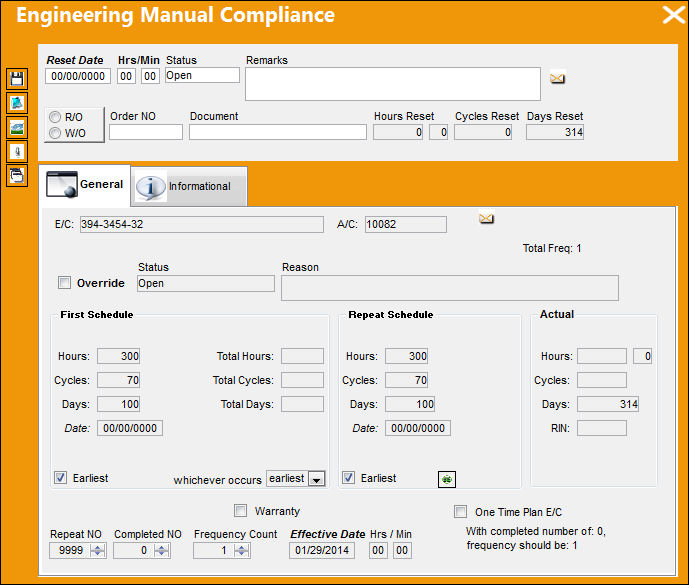
The following information/options are available in this window:
_____________________________________________________________________________________
Reset Date
The date that the E/C was complied with. This is the field to enter the manual date of compliance, thus resetting the schedule time (Hours/Cycles).
Hrs/Min
The time at which this E/C was complied with.
Status
The current status of the E/C Compliance (i.e. Open, Cancel, Terminate, etc.).
 With the proper security, the Status of the Engineering Manual Compliance for the individual records will be cascaded and reflected from the Status of the E/C.
 The feature is security controlled via the Security Explorer/ Engineering/ Update/ Engineering Control/ E/C Allow All Status Cascade - Individual. For additional information, refer to the Security Explorer, via the System Administration Training Manual.
Remarks
Any general remarks about the compliance event.
R/O or W/O
If the E/C was complied with on a Repair Order or a Work Order.
Order No
The relevant Repair Work Order Number.
Document
The document reference for this compliance event.
_____________________________________________________________________________________
Share
Print
|
©1997-2026 Trax USA Corp. All rights reserved. This manual may not be copied, photocopied, reproduced, translated, or converted to any electronic or machine-readable form, in whole or in part, without prior written approval from Trax USA Corp. |
 |