
 Share
Share
 Print
Print
|
|
|
|
|


Training Course Completion
The Training Course Completion option allows for the recording of the Completion status of each employee who has attended the Training Course. This process is performed once the employee has attended and completed the class.
The user can record completion information regarding each individual Subject/Task that is included in the Training Course. If the Training Course does not contain Subjects/Tasks, you will only record the Completion status for the Training Course itself. Subjects/Tasks were set up during the Training Course Registration process.
Once the Training Course Completion information is logged, the Training Course Completion Approval option will be used to approve the Completion status that has been awarded to employees who have attended the Training Course.
Scheduled employees (via Training/Update/Training Course Registration/Employee Schedule button) will not appear in the Completion list unless they have been enrolled into a specific class (via Training/Update/Training Course Registration/Employee Enrollment button).
Only enrollment records (via Training/Update/Training Course Registration/Employee Enrollment button) containing the Completion status of ‘Pending’ will be editable in the Completion list.
The following is the basic life cycle of the Training Process, particularly the Training Course Completion:
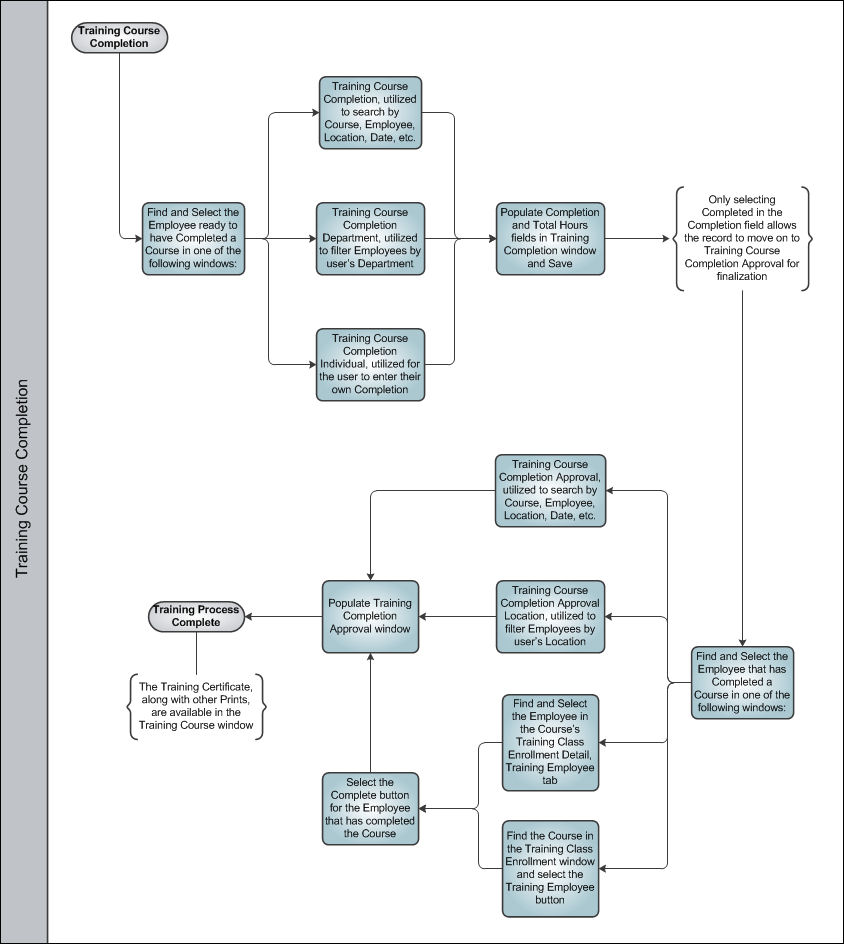
Once the Training Course Completion has been finalized, the Training Process is Complete.
Share
Print
|
©1997-2026 Trax USA Corp. All rights reserved. This manual may not be copied, photocopied, reproduced, translated, or converted to any electronic or machine-readable form, in whole or in part, without prior written approval from Trax USA Corp. |
 |