
 Share
Share
 Print
Print
|
|
|
|
|


Each individual program that allows Wall Password can be set against each employee selected (against the main or shared user ID).
From the Security Explorer/ User View, select an employee. Select the drop down menu. Right click on the Production Module, as shown below. Select the Select Detail option.
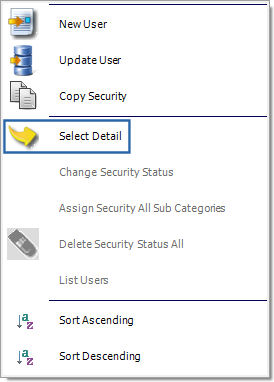
For more information on the Select Detail option, refer to the Select Detail Button (Security Explorer).
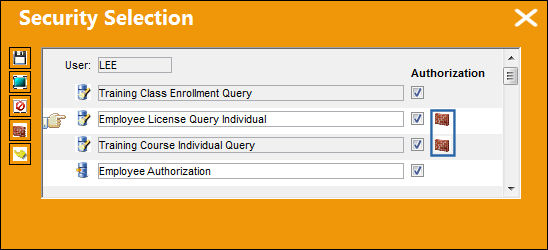
Use the scroll bar on the right to view the program(s) with the Wall  icon indicating there is a Wall Password requirement setup.
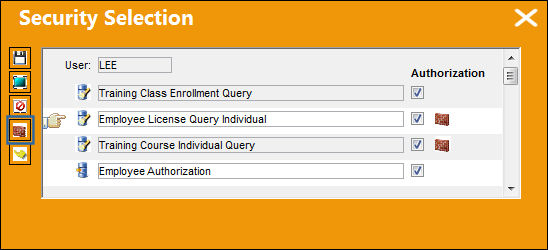
The Wall button appears on the left side of the Security Selection Window. Select the Wall button.
The Security Wall window appears allowing a Wall Password to be specified for the selected Employee.
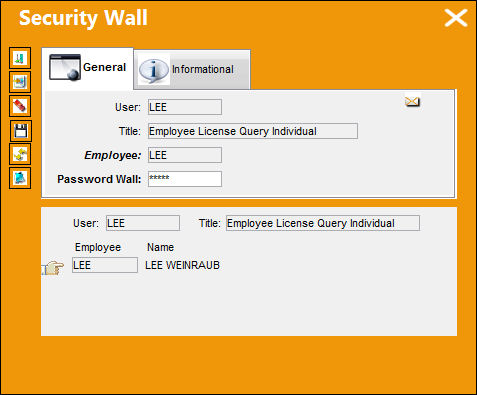
Wall passwords must be assigned to each employee record linked to the User or User Group. The same Wall Password cannot be used for multiple employee records. If a password already exists for another employee record, the following warning message will appear.
Share
Print
|
©1997-2026 Trax USA Corp. All rights reserved. This manual may not be copied, photocopied, reproduced, translated, or converted to any electronic or machine-readable form, in whole or in part, without prior written approval from Trax USA Corp. |
 |