
 Share
Share
 Print
Print
|
|
|
|
|


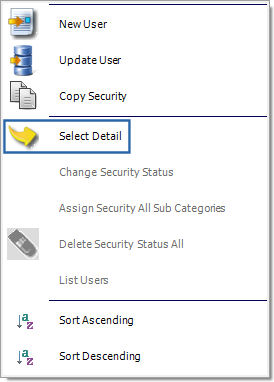
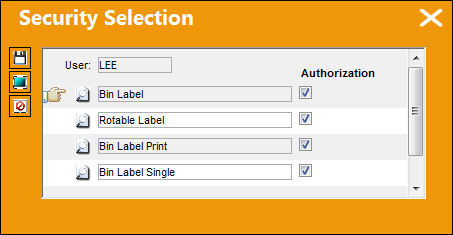
The Select Detail  button allows administrators to assign security to individual users/group profiles via a pop-up window that lists all security-controlled options for the selected module. This feature is accessed by selecting a user/group in the Security Explorer then right-clicking over a module or one of its four menu options (i.e. Explorer, Print, Query, Update).
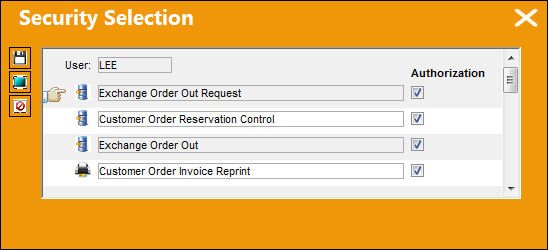
If selecting a module, all options for the entire module from all four categories are available for editing.
If selecting a specific module category, only the options under that category will be available. For instance, if selecting the Print category, only Print options will be available for editing.
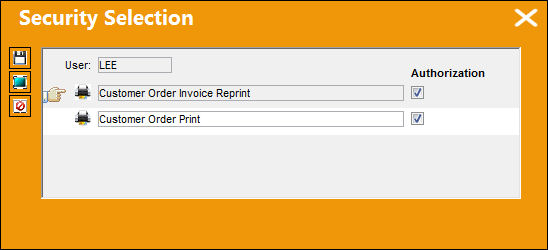
To remove or add access for an option, administrators must select or deselect the Authorization checkbox to the right then select the Save  button. A selected checkbox indicates access to the option. To apply the security controls for an entire module or category, the Select All
  and De-Select All
  buttons are available.
From the Select Detail feature, some options will have sub-options. These sub-options are indicated by the Select button that appears when a parent option is selected.
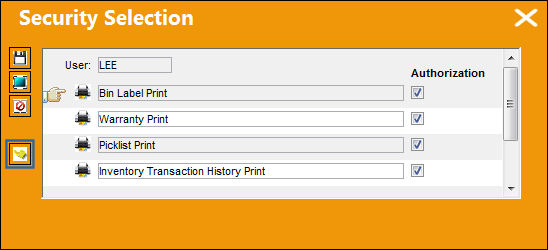
When the Select button is clicked, another Security Selection detail window appears listing the sub-options for that parent option. The same functionality applies for the sub-options as for the parent options above.
Wall Passwords can also be set up for individual users/user groups per each program by selecting the Wall  button. For detailed information refer to Wall Password Setup via Select Detail Button.
Share
Print
|
©1997-2026 Trax USA Corp. All rights reserved. This manual may not be copied, photocopied, reproduced, translated, or converted to any electronic or machine-readable form, in whole or in part, without prior written approval from Trax USA Corp. |
 |