
 Share
Share
 Print
Print
|
|
|
|
|


The Copy Security  button allows administrators to replace/modify one user's security with another user's. For example, a profile user could be created for Purchasing; this profile user is then used to copy security to all the other users in Purchasing. The user whose security settings are being modified must already have been created in the system (use the New User option to create the user). Click on the Copy Security button and TRAX displays the Security Copy window as follows:
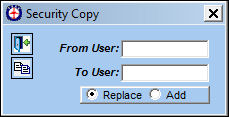
The following information/options are available in this window:
_____________________________________________________________________________________
From User
The user from whom security information will be copied.
To User
The user to whom security information will be copied. This field is automatically populated with the user selected in the Security Explorer.
Replace radio button
Replaces the To User's security with the From User.
Add radio button
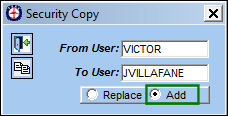
Adds the From User's security to the To User's security without disabling any security already applied to the To User.
_____________________________________________________________________________________
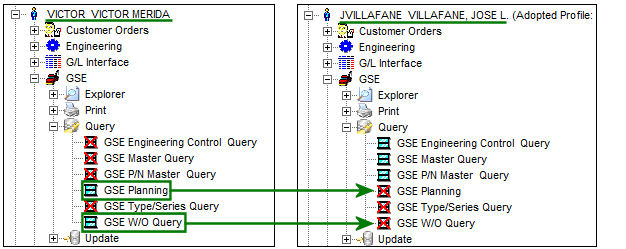
For example, the security of the below user on the left (the From User) must be copied to the user on the right (the To User).
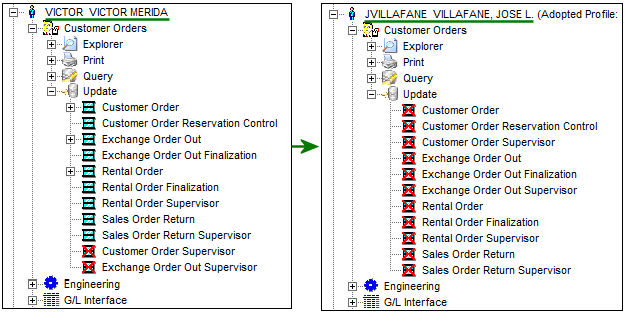
Select the Copy Security button. Notice the Replace radio button is selected. Select the Copy button.
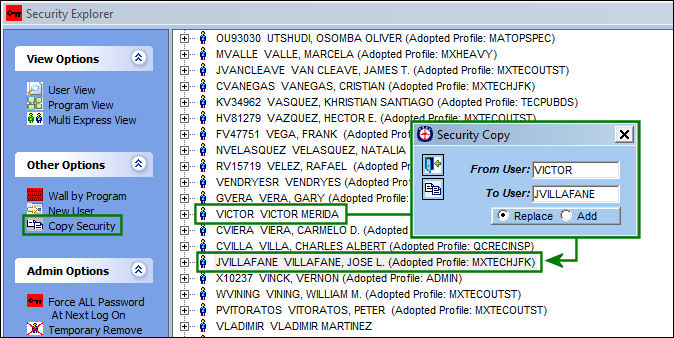
Once saved, notice that the security of the From User replaced the security of the To User.
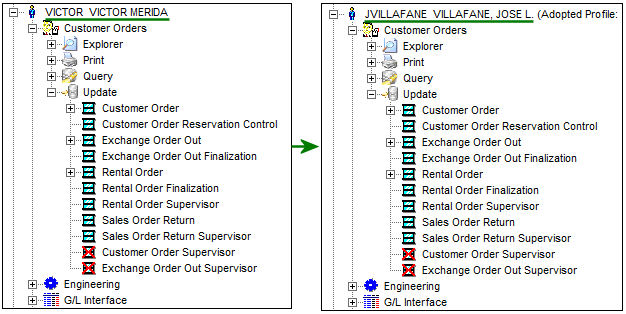
If security must be added from one user to another without removing any existing security to the receiving user, select the Add radio button when copying security. For example, notice the security of the below user on the left (the From User) must be added to the user on the right (the To User). However, the security already applied to the To User must not be removed.
Select the Copy Security button and click the Add radio button.
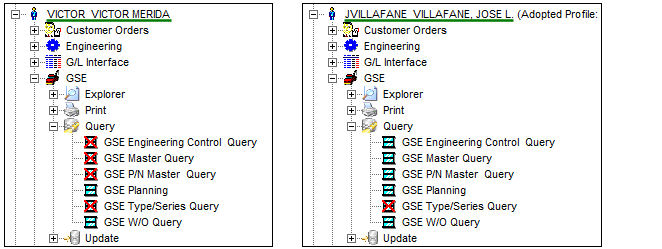
Notice the security of the From User has been applied to the To User without removing any security that the user already had.
Share
Print
|
©1997-2026 Trax USA Corp. All rights reserved. This manual may not be copied, photocopied, reproduced, translated, or converted to any electronic or machine-readable form, in whole or in part, without prior written approval from Trax USA Corp. |
 |