
 Share
Share
 Print
Print
|
|
|
|
|


The Delete Security All Sub Categories  button provides the same feature as the Change Security Status function only the security access is removed from all sub-categories of a specific parent category. This button is accessed by right-clicking over a security-controlled category with sub-categories in the Security Explorer.
For example, notice how each of the sub-categories under the Engineering Compliance category display the Access Granted  icon:
icon:
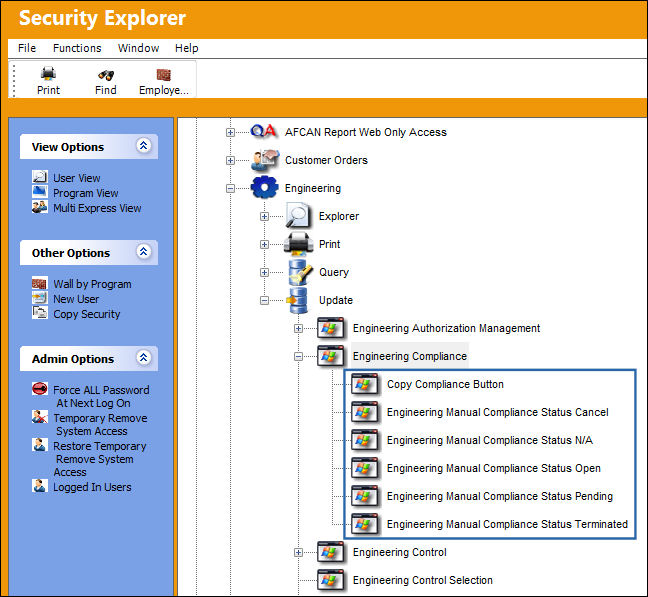
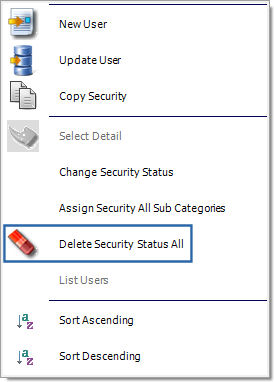
Right-click over the Engineering Compliance parent category and select the Delete Security Status All button.
All of the Engineering Compliance sub-categories will be restricted as indicated by the Access Denied  icons.
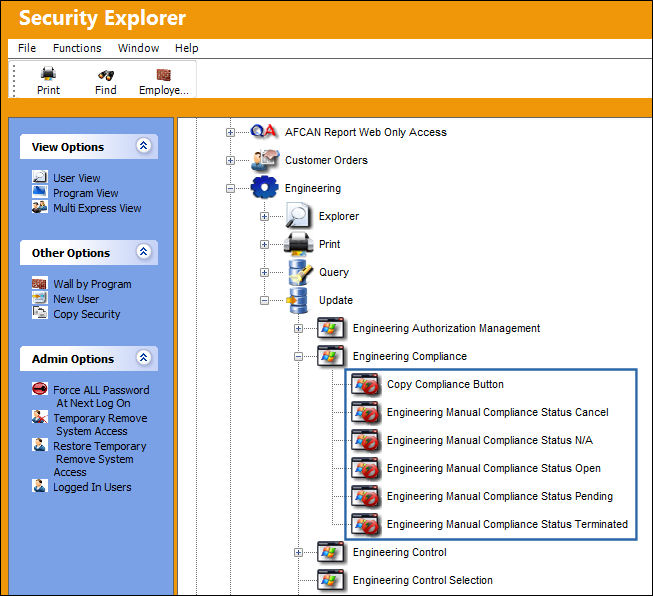
In order to see the changes applied to the sub categories, the parent category must be refreshed. To do this, close the parent category by selecting the collapse  icon to its left then open it again.
For information on applying access to a collection of sub-categories, refer to the Assign Security All Sub Categories Button.
Share
Print
|
©1997-2026 Trax USA Corp. All rights reserved. This manual may not be copied, photocopied, reproduced, translated, or converted to any electronic or machine-readable form, in whole or in part, without prior written approval from Trax USA Corp. |
 |