
 Share
Share
 Print
Print
|
|
|
|
|


The Multi Express View  is the third and final option available from the View Options menu of the Security Explorer window. Through this view administrators can assign security access to various users/group profiles for various options at a time. This view option differs from the first two view option for the following reasons. The User View deals with one user/group profile and multiple programs while the Program View deals with multiple users/group profiles but only one program at a time. The Multi Express View differs because it manages various amounts of users and also various amounts of programs at the same time. This can can be advantageous to administrators when assigning security access for new programs throughout the database. This view offers a wide range of security managing features from one location.
When selecting the Multi Express View feature, TRAX displays the following:
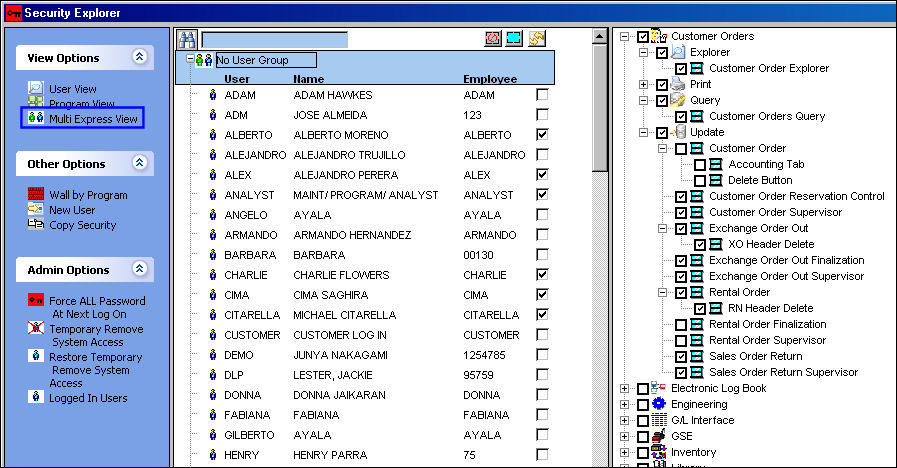
This security feature allows administrators to select individual users in the middle pane then select the programs in TRAX that the user(s) may access. In the right pane, entire modules/programs may be selected along with all other sub-menu programs by selecting the checkbox next to the module. TRAX then automatically populates the sub-menu program checkboxes. For example, in the below screen, by selecting Customer Orders  , all programs in the Explorer, Print, Query, and Update menu options are automatically selected:
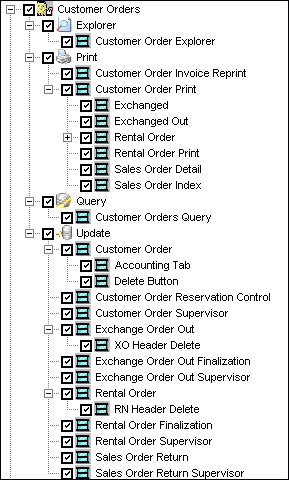
However, if the user de-selects the Customer Order option or any other combination of sub-options, TRAX re-displays the security access rights based upon what rights for access have been granted or not granted:
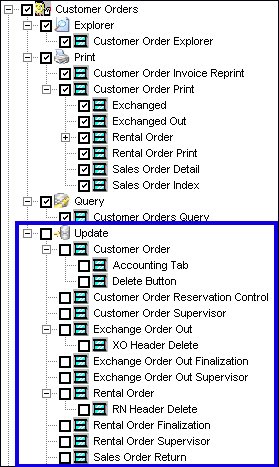
In the above screen, the Update Menu option was de-selected, TRAX thus de-selected all Update menu sub-options as well.
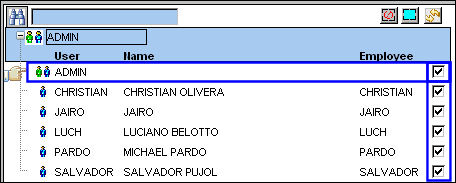
Aside from being able to update the security settings for individual users, the Multi Express View also allows for the updating of security access for group profiles. Notice the 'ADMIN' group below. The entire group is de-selected.
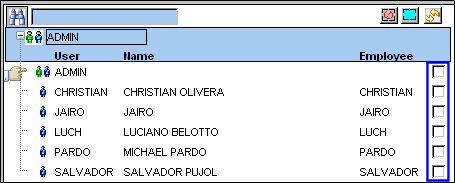
When an administrator selects the checkbox next to the main group profile name ('ADMIN'), all users within the group will be selected.
Other options available in both panes of the Multi Express View are the selections buttons:

_____________________________________________________________________________________
Select All  button
Selects all users/group profiles or security options available.
De-Select All  button
De-Selects all users/group profiles or security options available.
Reset  button
Will revert all of the selections made during the present session. (Only available in the user/group profile section)
_____________________________________________________________________________________
When finished with all of the security updates, administrators will need to save the information by selecting the Save  button at the bottom of the window. Administrators can also select the Delete
  button to remove security for the selected user/group.
Share
Print
|
©1997-2026 Trax USA Corp. All rights reserved. This manual may not be copied, photocopied, reproduced, translated, or converted to any electronic or machine-readable form, in whole or in part, without prior written approval from Trax USA Corp. |
 |