
 Share
Share
 Print
Print
|
|
|
|
|


From the Task Card Survey window, select the Answers button and the Task Card Survey Answers window opens. Select the New  button to create each response the user will be able to choose from when answering the question.
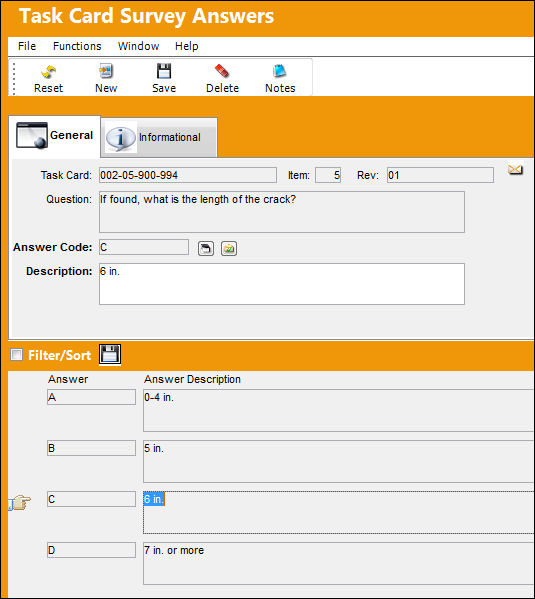
The following information/options are available in this window:
_____________________________________________________________________________________
Task Card
The Task Card / Job Card that details the scheduled maintenance work.
Item
The Item (question) number of the Task Card Survey.
Rev
The Task Card's most recent authorized revision number.
Question
The question that will appear to the user in the survey.
Answer Code
The short code of the answer used to organize the multiple choices.
Answer (E/C Control)  button
Select this button to set the Schedule Control based on the response of the Survey question. For additional information, refer to the Answer Button.
An E/C must be attached to a Task Card in order for the Multiple Choice functionality of the Task Card Survey to work.
System Notification  button
Select this button to display a notification message. For additional information, refer to the Notification button.
Description
The long description of the multiple choice answer.
_____________________________________________________________________________________
Share
Print
|
©1997-2026 Trax USA Corp. All rights reserved. This manual may not be copied, photocopied, reproduced, translated, or converted to any electronic or machine-readable form, in whole or in part, without prior written approval from Trax USA Corp. |
 |