 Download Online Help
 Print
|
|
|
|
|


Gantt Tab
The Gantt tab contains a graphical display listing all of the day's Task Cards for the selected W/O along with the user they are assigned to.
Filters can be applied to the chart to organize to content being displayed.
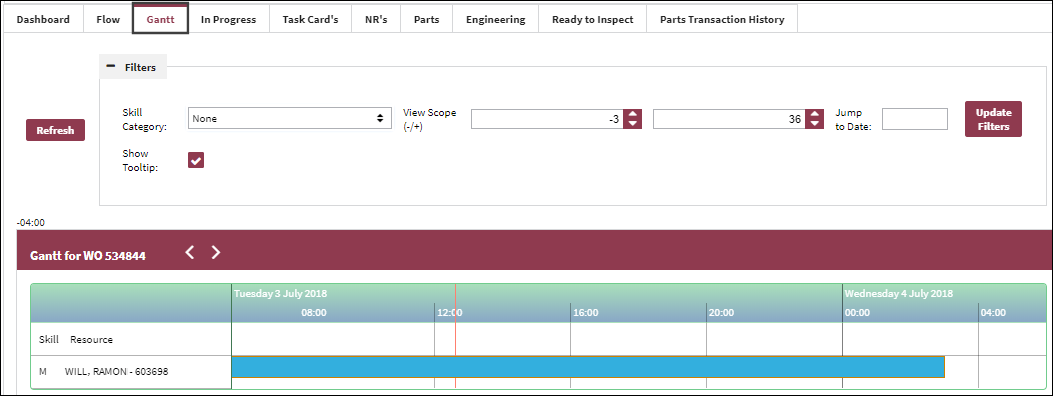
Note: For a Gantt personnel view of the entire Location, select the Resource Gantt Button via the Production Control Navigation Panel.
Select the Show Tooltip checkbox to view information hypertext that appears when hovering over a Task Card.
The following columns are listed in this table:
_________________________________________________________________________
Skill
The Skill Category abbreviation. The abbreviations are as follows: M - Mechanical, P - Propulsion, N - NDT, A - Avionics, I - Interiors, T - Treatment, S - Structures, C - Composites.
Resource
The employees assigned to Task Cards and Non-Routines.
_________________________________________________________________________
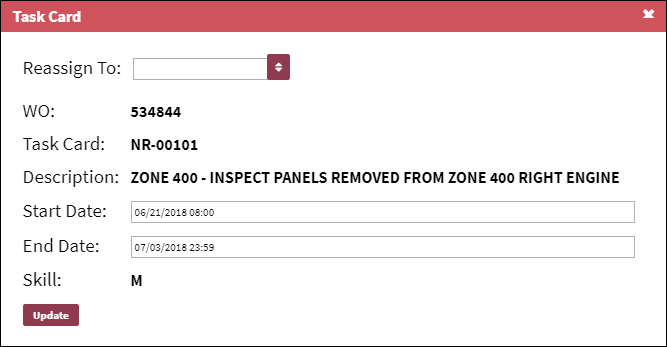
When a task is selected, the details are displayed in the pop-up window. From here, users can re-assign a Task Card from one employee to another by selecting the Reassign To drop down button.
Download Online Help
Print
|
©1997-2018 Trax USA Corp. All rights reserved. This manual may not be copied, photocopied, reproduced, translated, or converted to any electronic or machine-readable form, in whole or in part, without prior written approval from Trax USA Corp. |
 |