|
MANUALS > Shop > Shop Module > Shop, Update Menu > Shop W/O > Shop Work Order Detail > W/O Shop Detail, P/N Information Tab > Quote Button, via W/O Shop Detail, P/N Information Tab
Quote Button, via W/O Shop Detail, P/N Information Tab
Select the Quote  button to request a quote for the material, labor, and other requirements listed on the Shop Work Order.
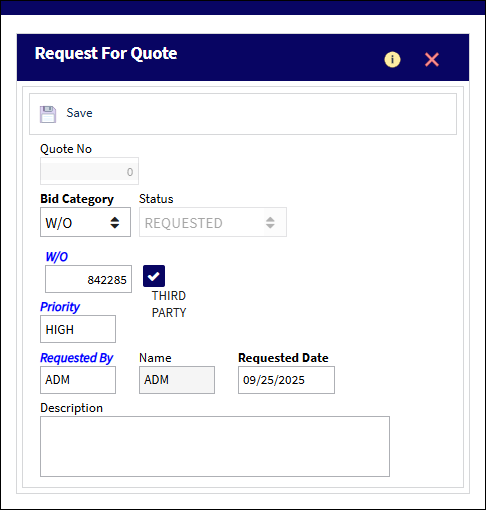
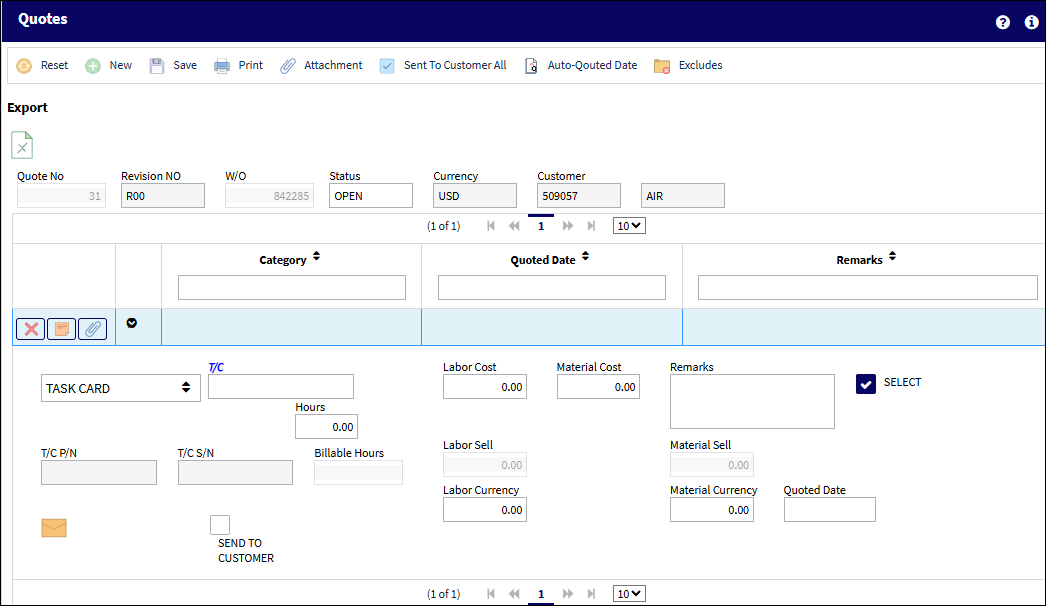
After selecting the Save  button, the system takes the user to the Quote window. This window allows the user to enter quotes for Bid Sheets per line item. The user may enter one or multiple items by selecting the New  button. For more information, refer to the Quote Entry button in the Shop training manual.
|
See Also W/O Shop Detail, P/N Information Tab Audit Button, via W/O Shop Detail, P/N Information Tab Notes Button, via W/O Shop Detail, P/N Information Tab Tear Down Button, via W/O Shop Detail, P/N Information Tab Attachment Button, via W/O Shop Detail, P/N Information Tab E/C Button, via W/O Shop Detail, P/N Information Tab P/N Interchangeability Button, via W/O Shop Detail, P/N Information Tab Task Card Button, via W/O Shop Detail, P/N Information Tab Mass N/R Button, via W/O Shop Detail, P/N Information Tab Return To Owner Button, via W/O Shop Detail, P/N Information Tab eMRO ARC Button, via W/O Shop Detail, P/N Information Tab eMRO ARC Remarks button, via W/O Shop Detail, P/N Information Tab N/R Button, via W/O Shop Detail, P/N Information Tab Change P/N Button, via W/O Shop Detail, P/N Information Tab NLA Installation/Removal Button, via W/O Shop Detail, P/N Information Tab P/N Brk-Dwn Button, via W/O Shop Detail, P/N Information Maintenance Manual, via W/O Shop Detail, P/N Information Tab |
|

 Share
 Print


