
 Share
 Print
|
|
|
|
|


The Tear Down  button is used to review or create a Tear Down Report associated to an order that is going through the Receiving Inspection process.
Note: When multiple Serial Numbers are received into the system via Purchase Order, the system now displays multiple Serial Numbers on the Tear Down Report Print.
The System allows us to Receive Multiple Serial Numbers (Individually) but only creates one teardown for the first S/N Received.
From the Receiving Inspection window, select the Tear Down button.
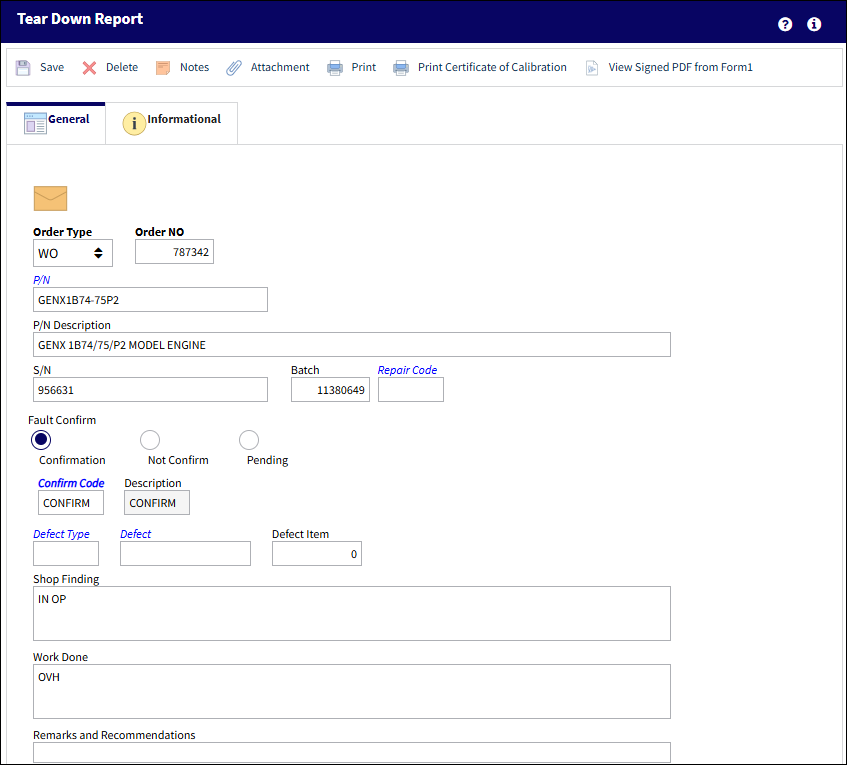
Note: For additional information, please refer to the Tear Down Report section of this manual.
The following information/options are available in this window:
_____________________________________________________________________________________
Order Type
Type of Order. By order type, certain receiving and financial behaviors will be assigned to the order at receiving of the various Order Types. These order types exist under the Orders or Customer Orders Modules exclusively. All Order Types are Hard Coded into the programming syntax.
Order NO
The type of order and the order number for the transaction.
P/N
The Part Number reference for the aircraft part.
P/N Description
The description of the part.
S/N
The Serial Number for the specific serialized part.
Batch
The inventory number that is currently associated with a part or group of parts. A part's Batch number can change after various types of transactions take place.
Repair Code
The repair code associated to the part number.
Condition 
The condition of the part.
Note: This field is mandatory and the record is unable to be saved if left unpopulated.
Scrap checkbox
Indicates that this is a scrapped part.
Scrap Code
The Scrap Code for this transaction. This field is only available if the Scrap Checkbox is selected.
Note: If the Scrap checkbox is selected, the Scrap Code field is mandatory and the record is unable to be saved if left unpopulated.
Fault Confirm radio buttons
The Fault Confirm radio buttons are an important element for reliability purposes. Based upon whether the confirmed, not confirmed or pending is selected will impact reliability reporting.
Confirm Code
The confirmation reference along with applicable information.
Confirm Code Description
A free-text description of the item.
Defect Type
The type of defect found on the aircraft (for example, Pilot Report, MX Report).
Defect
The defect number (or log book number).
Defect Item
The defect log item number.
Shop Finding
The results of the shop inspection.
Work Done
The Item work that was performed by the mechanic.
Remarks and Recommendations
Allows lead mechanics or supervisors to provide recommendations to the mechanic(s) who worked on the Tear Down.
Share
Print
|
©1997-2026 Trax USA Corp. All rights reserved. This manual may not be copied, photocopied, reproduced, translated, or converted to any electronic or machine-readable form, in whole or in part, without prior written approval from Trax USA Corp. |
 |