
 Share
 Print
|
|
|
|
|


Select the P/N Change  button to change the Shop P/N S/N to a new P/N S/N. When selected, the Shop Item P/N S/N Modify To window pops up.
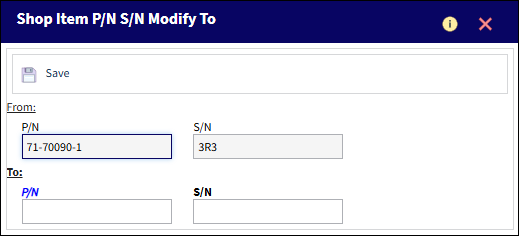
The following information/options are available in this window:
_____________________________________________________________________________________
From P/N, S/N
The current Part Number and Serial Number being worked on.
To P/N, S/N
The Part Number and Serial Number that the part is being modified to.
Note: The P/N Change will go throughout the entire system and change the part number of the selected part. While the inventory transaction can still be looked up in the Inventory Transaction History Query using both the old and the new part number, the system will display the new part number in every other place.
_____________________________________________________________________________________
Once saved, the following question prompt appears.
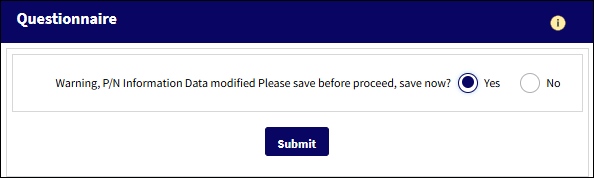
Note: In order for the updated P/N S/N information to be listed in the P/N Identification Tag, your company-specific tag must be customized to show the modified P/Ns. eMRO operators can request this customization through a Modification log.
Share
Print
|
©1997-2026 Trax USA Corp. All rights reserved. This manual may not be copied, photocopied, reproduced, translated, or converted to any electronic or machine-readable form, in whole or in part, without prior written approval from Trax USA Corp. |
 |