
 Share
 Print
|
|
|
|
|


P/N Control
A System Transaction Code is defined with the Code Name and Description. The Code Description directly states its functionality and role in the system, populating applicable fields as tasks are performed.
Transaction Code: |
P/N Control |
General Description: |
Part Number schedule controls |
Are Authorization Steps Available? |
Yes |
Is System Notification Available? |
Yes |
Control Panel Path(s): |
Settings/Update/P/N Master/P/N Control Button |
Windows(s): |
w_pn_control_eu |
Related Switch(s): |
None |
Functions: |
n/a |
Reports: |
None |
Available Functionality:
Parts are associated with P/N Controls via Settings/ Update/ P/N/ P/N Control Button. P/N Controls can be modified through the following settings.
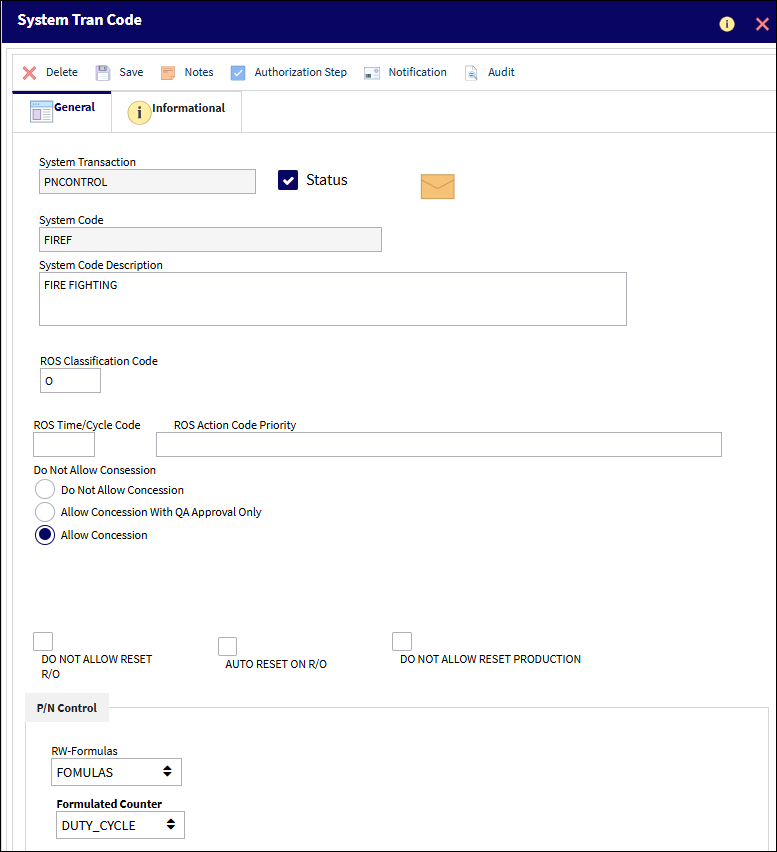
The following information/options are available in this window:
_____________________________________________________________________________________
Authorization Steps  button
This Transaction Code's default setting is for creating a One-Step Authorization. However, any number of steps can be created. Click on the Steps button to create steps that will require completion during the P/N Control Authorization Process. Once these Authorization Steps have been set up, whenever a P/N is associated with a Control, and a part is received into the system, that P/N Control must be authorized (the steps must be 'Accepted') via Technical Records/ Explorer/ P/N Control\P/N E/C Authorization. For detailed information on how to set up Authorization Steps, refer to the P/N Control Authorization Steps Button via the Engineering E/C Training Manual.
System Notification  button
This button is used to set up system generated notifications to be sent to a user when a P/N Control has been created, updated, or deleted. For information on how to set up System Notifications, refer to Setup - System Notification, via System Notifications of the Settings Training Manual.
Rotor Wing checkbox
Select this checkbox to indicate that the P/N Control is only for Rotor Wing Aircraft parts. When selected, a customizable set of formulas can be applied to the P/N Control in order to track specific features of Rotor Wing Aircraft. These formulas can be created/modified via the Formula window in Settings module. When the checkbox is selected, the Formulated Counter drop down prompt appears. This drop down lists all of the formulas available to the P/N Control. One option must be selected from the drop down when the Rotor Wing checkbox is selected.
 Note: The Rotor Wing checkbox has been replaced by the Rotor Wing option in the RW-Formulas drop-down.
ROS Time/Cycle Code
This code maps Repair Order Services (ROS) information to the AeroXchange interface.
ROS DocType
This code maps Repair Order Services (ROS) information to the AeroXchange interface.
Do Not Allow Reset R/O checkbox
Check to indicate that this Time Control should not be reset (selected for compliance) when this Time Control is associated with a Repair Order. When selected, the Auto Reset On R/O checkbox is not available.
Auto Reset On R/O checkbox
Check to indicate that this Time Control should be reset (selected for compliance) when this part is associated with a Repair Order. This checkbox is not available when the Do No Allow Reset R/O checkbox is selected.
Do Not Allow Reset Production checkbox
Check to indicate that this Time Control should not be reset when this Time Control is associated with a Production Work Order.
Concession radio buttons
Define the concession (a.k.a short-term escalation) allowance for a given P/N Control:
Do Not Allow Concession radio button - Prevents any user from creating a Concession Registry against the P/N Control.
Allow Concession With QA Approval Only radio button - Will only allow concessions, which have gone through the proper authorization process to be applied to the P/N Control.
Allow Concession radio button - Default setting, will allow the user to create Concessions for the P/N Control.
RW-Formulas
To set up a custom formula for a P/N Control, select Rotor Wing or Formulas from the drop-down. None is selected by default.
Formulas - Select the Formulas option to indicate that the P/N Control is only for Firefighting aircraft parts. When selected, a customizable set of formulas can be applied to the P/N Control in order to track specific features of Firefighting aircraft. These formulas can be created/modified via the Formula window in Settings module. When this option is selected, the Formulated Counter drop-down appears. This drop-down lists all of the formulas available to the P/N Control. One option must be selected from the drop-down when the Formulas option is selected is selected.
Rotor Wing - Select the Rotor Wing option to indicate that the P/N Control is only for Rotor Wing aircraft parts. When selected, a customizable set of formulas can be applied to the P/N Control in order to track specific features of Rotor Wing aircraft. These formulas can be created/modified via the Formula window in Settings module. When this option is selected, the Formulated Counter drop-down appears. This drop-down lists all of the formulas available to the P/N Control. One option must be selected from the drop-down when the Rotor Wing option is selected is selected.
Note: This option replaces the Rotor Wing checkbox functionality.
None - Select the None option to indicate that there are no formulas associated with the P/N Control.
Formulated Counter drop-down - The Formulated Counter drop-down allows users to apply a formula to the P/N Control to track the specific features of Rotor Wing or Firefighting aircraft. Formulas can be created/modified via the Formula window in Settings module. In order to access this drop-down, the Rotor Wing or Formulas option must be selected.
_____________________________________________________________________________________
These Checkboxes also appear via Settings/ Update/ P/N/ P/N Control Button, where they can be overridden if required.
Share
Print
|
©1997-2026 Trax USA Corp. All rights reserved. This manual may not be copied, photocopied, reproduced, translated, or converted to any electronic or machine-readable form, in whole or in part, without prior written approval from Trax USA Corp. |
 |