
 Share
 Print
|
|
|
|
|


Vendor Category
A System Transaction Code is defined with the Code Name and Description. The Code Description directly states its functionality and role in the system, populating applicable fields as tasks are performed.
Transaction Code: |
Vendor Category |
General Description: |
Category of the Vendor |
Are Authorization Steps Available? |
No |
Is System Notification Available? |
Yes |
Control Panel Path(s): |
Settings/Update/Vendor |
Windows(s): |
w_vendor_master_eu |
Related Switch(s): |
None |
Functions: |
n/a |
Reports: |
Vendor Prints |
Available Functionality:
This Transaction Code has the additional functionalities of Notification, Vendor Default Status and InvoiceWorks Capable checkbox.
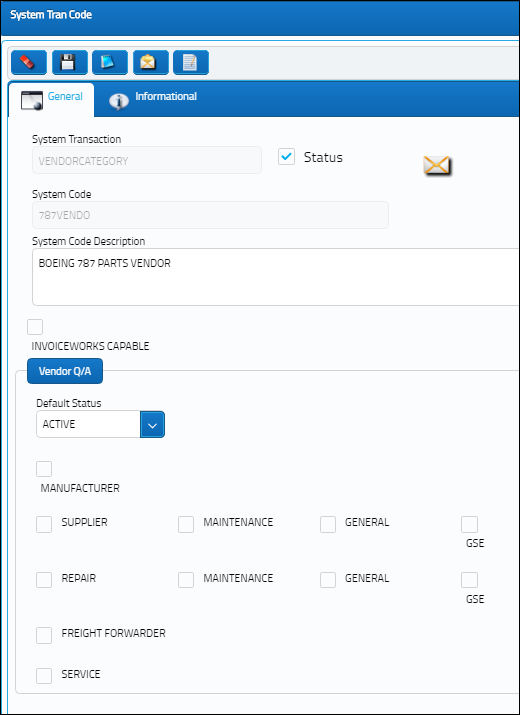
The following information/options are available in this window:
_____________________________________________________________________________________
InvoiceWorks Capable checkbox
Users can also select the Invoice Capable checkbox is order to automatically have the Invoice Works checkbox of the Vendor Master, Optional tab selected when a Vendor with this Category is created. This checkbox indicates that the Vendor is able to use the InvoiceWorks XML format for sending out Purchase Orders. For more information refer to the Vendor Master, Optional Tab via the Settings Training Manual.
Default Status drop down
Enter the Vendor Default Status as necessary that applies to this Transaction Code.
Vendor Q/A checkboxes
Users can select one or multiple Vendor Q/A checkboxes so that when the specified Vendor Category is selected, the status of the checkbox(s) will cascade down to the Vendor Master, General tab.
Note: The setup in the Vendor Category Transaction Code will be protected if Switch  VNDPRCTCATOF is set to Yes. For additional information, refer to Switch VNDPRCTCATOF of the Settings Training Manual.
_____________________________________________________________________________________
Share
Print
|
©1997-2026 Trax USA Corp. All rights reserved. This manual may not be copied, photocopied, reproduced, translated, or converted to any electronic or machine-readable form, in whole or in part, without prior written approval from Trax USA Corp. |
 |