
 Share
 Print
|
|
|
|
|


MEL Subs
A System Transaction Code is defined with the Code Name and Description. The Code Description directly states its functionality and role in the system, populating applicable fields as tasks are performed.
Transaction Code: |
MELSUB |
General Description: |
MEL SUB CATEGORIZATION |
Are Authorization Steps Available? |
N |
Is System Notification Available? |
N |
Related Switch(s): |
N/A |
Functions: |
Authorization Process Setting |
Reports: |
N/A |
Available Functionality:
The MEL Subs transaction code allows users to create new MEL options for specification and clarification purposes. New and previous MEL options can be used to narrow search results and create accurate reports. Although the hard coded options of MEL, CDL, and GMM have been moved to the MELSUB transaction code, their functionality remains the same.
To create a new MEL option, navigate to Settings > System Tran Code Explorer > Settings > MEL SUB.
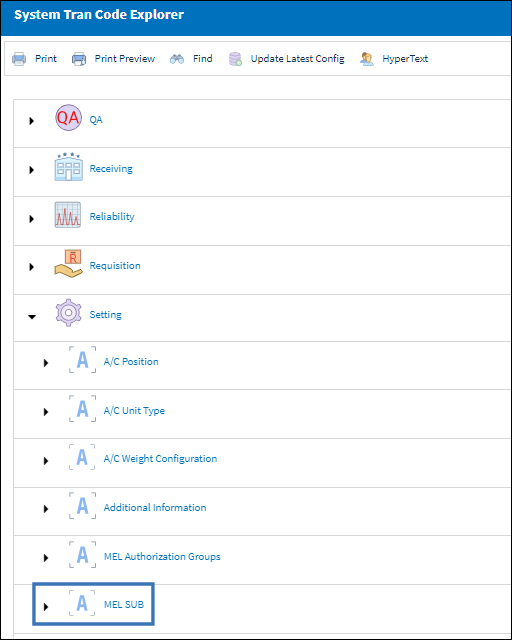
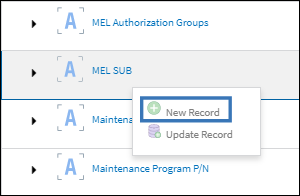
Select "MEL SUB' and choose the New Record  button.
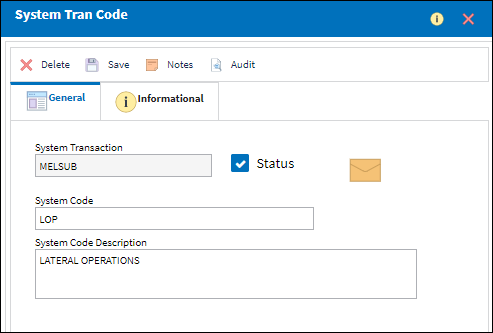
The New System Tran Code window appears. Populate the available fields with the appropriate information and select the Save  button.
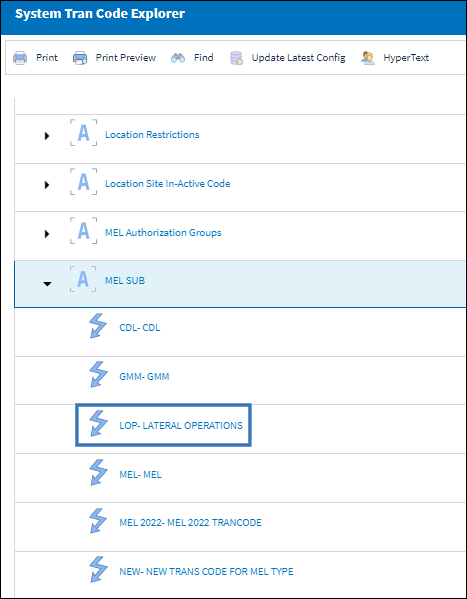
Upon saving, the new MEL option is available for use within the system.
Share
Print
|
©1997-2026 Trax USA Corp. All rights reserved. This manual may not be copied, photocopied, reproduced, translated, or converted to any electronic or machine-readable form, in whole or in part, without prior written approval from Trax USA Corp. |
 |