 Download Online Help
 Print
|
|
|
|
|


Manual Compliance can be conducted for a specific P/N Engineering Control through selecting the desired record from the Engineering Control P/N window, accessed through the P/N CTL  button.
Note: This window is a query only window, and cannot be edited or updated. To update/edit any information in the Engineering Control P/N window, the user must do so via the P/N CTL Button, via Engineering Control.
From the Engineering Control Compliance window, select the P/N CTL button.
The system displays the Engineering Control P/N window. For information regarding the fields and functions in the Engineering Control P/N window, refer to the P/N CTL Button, via Engineering Control Buttons, of the Engineering - E/C Training Manual. However, the Compliance  button, and therefore Manual Compliance functionality for a P/N as a whole, will only be available if the requirements have been met for the E/C of the P/N selected.
Note: With the proper security, the Status of the Engineering Manual Compliance for the individual records will be cascaded and reflected from the Status of the E/C.
 The feature mentioned above is security controlled via the Security Explorer/ Engineering/ Update/ Engineering Control/ E/C Allow All Status Cascade - Individual. For additional information, refer to the Security Explorer, via the System Administration Training Manual.
Upon selecting the Compliance button, the Engineering Manual Compliance Detail is displayed.
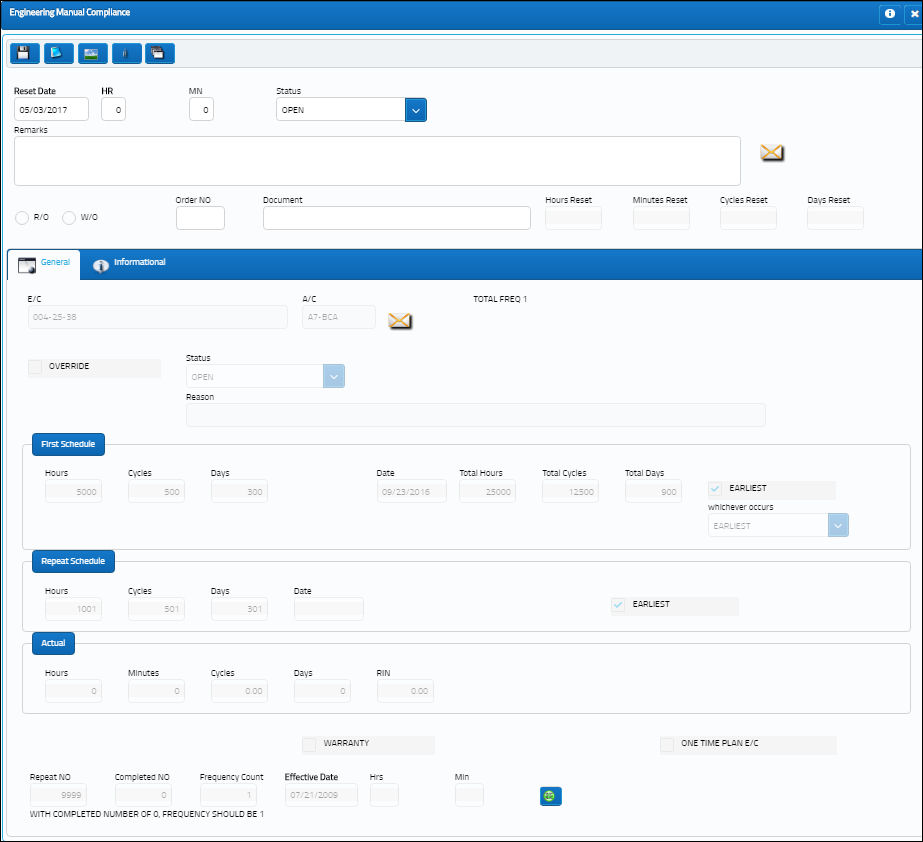
Within the Engineering Manual Compliance Detail for the P/N E/C, the Compliance information can be populated at the top.
The following options/information is available in this window:
_________________________________________________________________________
Reset Date
The date that the E/C was complied with through the Work Order (Production or Shop) bgin Closed or the Repair Order being received.
Hrs/Min
The time at which this E/C was complied with through the Work Order (Production or Shop) being Closed or the Repair Order being received.
Status
The current status of the E/C Compliance (i.e. Open, Cancel, Terminate, etc.).
Remarks
Any general remarks about the compliance event.
R/O or W/O
If the E/C was complied with on a Repair Order or a Work Order.
Order No.
The relevant Repair or Work Order Number the E/C was complied against.
Document
The document reference number associated to the E/C.
Hours/Cycles/Days Reset
E/C hours/cycles/days at time of reset.
_________________________________________________________________________
General information regarding the P/N E/C can be viewed and/or edited, as needed, through the following tabs and buttons:
Engineering Manual Compliance (P/N) |
Engineering Manual Compliance (P/N) |
General Tab
|
|
 Save button


 E/C Called On button
To conduct the Manual Compliance for a specific P/N S/N, select into a record by clicking into it. Doing so will bring the user to the Engineering Effectivity Override for P/N S/N Engineering Control Manual Compliance.
If the user enters a Reset Date prior to the current effective date of the E/C for the or P/N S/N, the system will only write a historical record and update the completed NO., however the Effective Date will not change. If the user enters a date after the current effective date, the system will write a history record and change the effective date of the item. If the user changes the status to Terminated, Cancel or N/A, the system will make the repeat number equal to the completed number. This will terminate the E/C and it will no longer appear in the Planning query option.
The compliance record for the E/C is written upon saving the record. The user can edit/amend/delete previously created compliance records if required.
Download Online Help
Print
|
©1997-2018 Trax USA Corp. All rights reserved. This manual may not be copied, photocopied, reproduced, translated, or converted to any electronic or machine-readable form, in whole or in part, without prior written approval from Trax USA Corp. |
 |