
 Share
Share
 Print
Print
|
|
|
|
|


A/C Master, Other 1 Tab
In the A/C Master, Other 1 tab, users can enter additional details for an aircraft (e.g., Owner, Company, etc.).
Select the Other 1 tab and TRAX displays the following window:
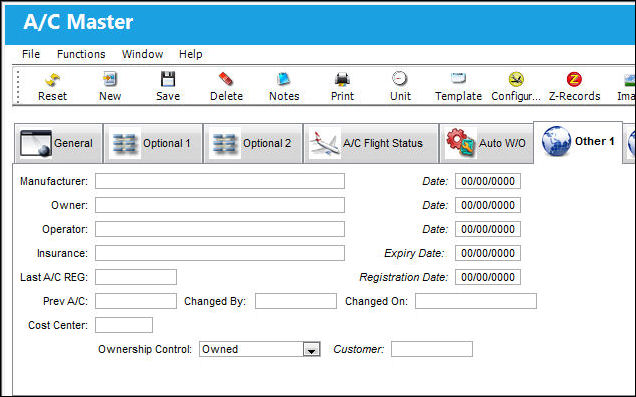
The following information/options are available in this window:
_____________________________________________________________________________________
Manufacturer/Date
Date and Name of Aircraft manufacturer.
Owner/Date
The Owner of the Aircraft and Date owned from.
Operator/Date
The Operator of the Aircraft and Date operated from.
Insurance/Expiry Date
The Insurance company and Insurance Expiry date.
Last A/C Reg/ Registration Date
The last A/C registration (if applicable) and registration date.
Prev A/C
The Previous Aircraft code.
Changed By
The Identification Code of the Individual making changes.
Changed On
The Date on which changes were made to the A/C Master.
Cost Center
The G/L Cost Center associated to the Aircraft.
G/L Company
This field appears only when G/L Interface Switch  COMPANYMULTI is set to 'Yes.' This feature is part of the Multi-Company functionality. Parent company's airlines are entered into this field. Then, when the P/N is entered into the detail window, the G/L field will be auto-populated with this airline's previously created G/L Account. When the switch is set to 'No' the field is titled Category and functions as defined above. For more information see the G/L Interface Switch COMPANYMULTI via the G/L Interface Switches Manual.
The G/L Company specified in this field will be transferred to the installed part(s). The user can view this information from the Inventory Transaction Detail, Accounting Tab via Inventory Transaction which can be found in the Inventory Training manual.
Ownership Control
Select the drop down Menu to select the correct description for Ownership Control.
Dry Lease - An aircraft that the user's company leases from a lessor, but provides its own crew and exercises operational control.
When 'Dry Lease' is selected, all fields for all transactions will have free text for that aircraft via Technical Records/Update/A/C P/N Transaction.
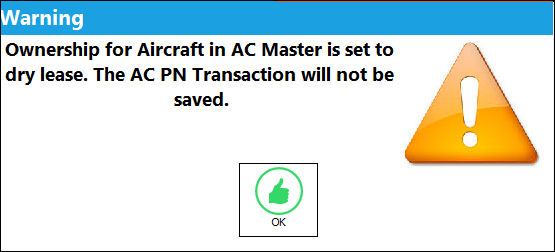
When Dry Lease is selected in the Ownership Control of the aircraft, the install or removal history record will still be written, even though the part is not actually installed nor removed. The system will display a warning to inform the user of the above stated functionality: 'Ownership for Aircraft in A/C Master is set to dry lease. The AC PN Transaction will not be saved.'
Managed - The aircraft belongs to one of the user's customers and the company manages all third party work against the aircraft in a long term contract which includes inventories management. For additional 'Managed' functionality information please refer to the Manage Parts Functionality in Inventory.
With the Managed Ownership Control selected the Customer Field will become mandatory. When this aircraft is placed on a W/O the Third Party checkbox will be selected by default and may not be de-selected. Please see Work Order, General Tab for additional information.
Owned - The aircraft belongs to the user's company as purchased.
Third Party Only - The aircraft belongs to one of the user's customers and the company manages all third party work against the aircraft in a long term contract excluding inventories.
With the Managed Ownership Control selected the Customer Field will become mandatory. When this aircraft is placed on a W/O the Third Party checkbox will be selected by default and may not be de-selected. Please see Work Order, General Tab for additional information.
Wet Lease - An aircraft and its crew that the user's company leases from a lessor who maintains operational control.
Customer
If the aircraft belongs to a customer, specify the customer here.
_____________________________________________________________________________________
Manufacturer, Owner, and Operator can be different, with different dates (i.e. leasing an A/C).
Share
Print
|
©1997-2026 Trax USA Corp. All rights reserved. This manual may not be copied, photocopied, reproduced, translated, or converted to any electronic or machine-readable form, in whole or in part, without prior written approval from Trax USA Corp. |
 |