
 Share
Share
 Print
Print
|
|
|
|
|


A/C Master, Auto W/O Tab
From the A/C Master, Auto W/O tab, the appropriate fields will automatically populate new Work Orders when the W/O Auto - New  button is used for the same Aircraft via the Planning module. Please refer to the W/O Auto - New Button via the Planning Training Manual for more information.
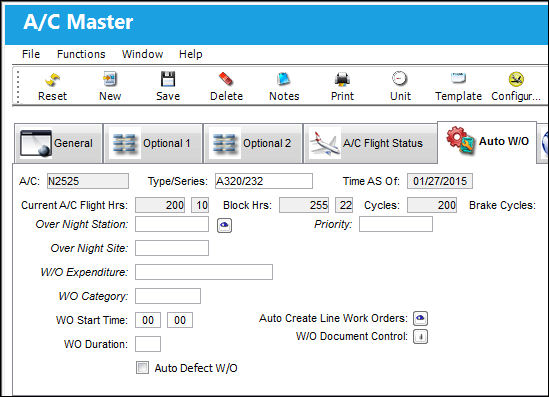
The following information/options are available in this window:
_____________________________________________________________________________________
A/C
The individual aircraft tail number.
Type/Series
The Aircraft Type and Series/Fleet assignment.
Time As Of
This field displays the last stamped flight log date that has been entered in the system for this aircraft.
Current A/C Flight Hrs.
The current number of accumulated aircraft Flight Hours and Minutes as of the current Time AS Of date.
Block Hours
The current number of accumulated aircraft Block Hours and Minutes as of the current Time AS Of date.
Cycles
The current number of accumulated Aircraft Cycles as of the current Time AS Of date.
Brake Cycles
The current number of accumulated Aircraft Brake Cycles as of the current Time AS Of date.
Overnight Station
The Overnight Station code. Changing the Overnight Station on the A/C Master, Auto W/O tab changes it on the A/C Master, Optional 2 Tab and the A/C Master, A/C Flight Status Tab.
Overnight Station  button - The Overnight Station button allows the user to add an Overnight Station to the Auto W/O functionality for the selected A/C.
The Overnight Station data can be synced through the Flight Interface: Flight_Schedule_Master_Service method setAC_Overnight_Station. For more information contact the Trax Interface Team.
Overnight Site
The Overnight Site code.
W/O Expenditure
Work Order expenditure code.
W/O Category
Work Order Category code.
W/O Start Time
The start time for the Work Order.
W/O Duration
The duration of the Work Order in hours.
Auto Defect W/O checkbox
When selected, whenever a Defect Report is created for the selected Aircraft, a Work Order is automatically created based on the information entered against the Defect. When the Auto Defect W/O checkbox is selected, the Contract Number field appears and is mandatory. This Customer Contract defines how the Third Party provider will charge their customer for required maintenance on the customer's aircraft. For detailed information on how this checkbox works, refer to the Auto Defect W/O Checkbox, via A/C Master, Auto W/O Tab in the Settings Training Manual.
Contract - The Contract Number that the Work Order is pulled from when being auto generated for the Defect Report. Only Active Contracts will be available for selection.
Auto Create Line Work Orders  button
The Auto Create Line Work Orders button allows the user to set up the default parameters to be done for a line Work Order per aircraft. For additional information, refer to Auto Create Line Work Orders Button via the Settings Training Manual. There is also an option to manually create the Line Work Orders via the Auto Line W/O Generation  button. For additional information, refer the the Auto Line W/O Generation Button which can be found in the Work Order section of the Production Training Manual.
W/O Document Control  button
Allows users to attached documents regarding the Work Order. For additional information, refer to the W/O Document Control Button, via the A/C Master, auto W/O Tab of the Settings Training Manual.
_____________________________________________________________________________________
Share
Print
|
©1997-2026 Trax USA Corp. All rights reserved. This manual may not be copied, photocopied, reproduced, translated, or converted to any electronic or machine-readable form, in whole or in part, without prior written approval from Trax USA Corp. |
 |