
 Share
Share
 Print
Print
|
|
|
|
|


A/C Master, Other 3 Tab
In the A/C Master, Other 3 tab, users can enter additional details for an aircraft (e.g., Delivery Position, Original Operator, etc.).
Select the Other 3 tab and TRAX displays the following window:
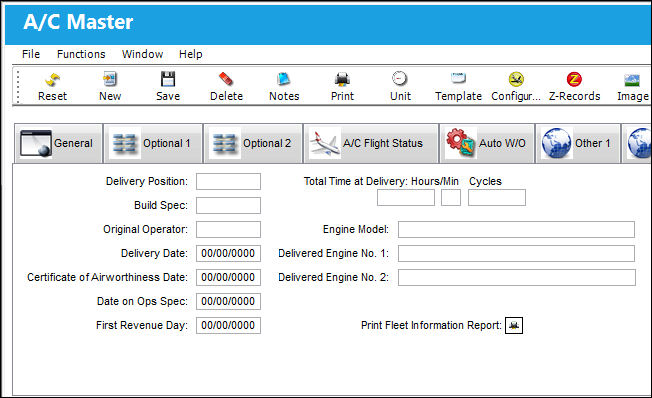
The following information/options are available in this window:
_____________________________________________________________________________________
Delivery Position
Enter the sequence in which the aircraft was delivered.
Build Spec
Enter the alpha numeric indicator of the operator that the aircraft was built for.
Original Operator
Enter the name of the original company operating the aircraft.
Delivery Date
Enter the date that the aircraft was delivered to the company.
Certificate of Airworthiness Date
Enter the date that the aircraft Certificate was signed.
Date on Ops Spec
Enter the date that the aircraft was added to the operation specifications.
First Revenue Day
Enter the 1st day of Revenue flying.
Total Time at delivery: Hours/Min/Cycles
Enter the total time (hours, minutes, flight cycles) accumulated on the aircraft at the time the aircraft was delivered.
Engine Model
Enter the aircraft engine model (ex: CFM56-7B22).
Delivered Engine No. 1
The engine number delivered with the aircraft.
Delivered Engine No. 2
The engine number delivered with the aircraft.
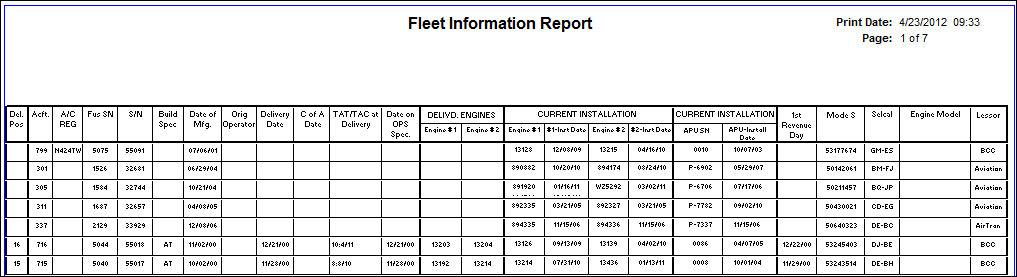
Print Fleet Information Report  button
Select this button to print the fleet information report as shown below.
_____________________________________________________________________________________
Share
Print
|
©1997-2026 Trax USA Corp. All rights reserved. This manual may not be copied, photocopied, reproduced, translated, or converted to any electronic or machine-readable form, in whole or in part, without prior written approval from Trax USA Corp. |
 |