 Download Online Help
 Print
|
|
|
|
|


The Inventory Detail, Optional Tab displays any related Receiving, Receiving Inspection, and Expiration information related to the part:
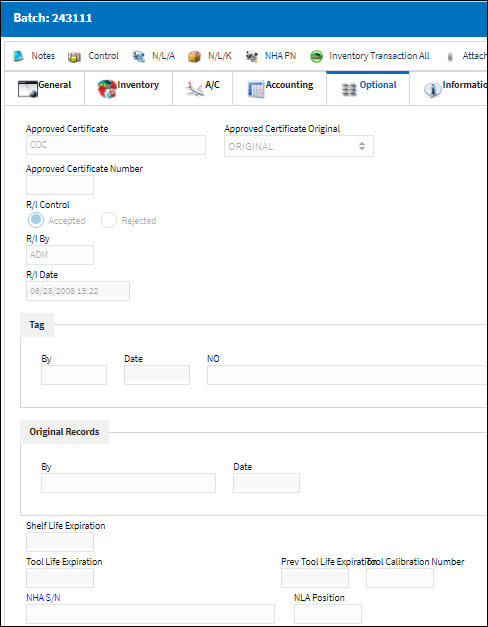
The following options/information is available in this window:
_________________________________________________________________________
Approved Certificate
The type of certificate approving the part (ie. Form 1, EASA etc.). The user may choose from a pre-defined transaction code, or enter the Approval Certificate manually.
R/I Control
Displays if the Receiving Inspection for the part has been accepted or rejected upon entering the system.
R/I By
Name of person/group who performed the Receiving Inspection.
R/I Date
Date of the Receiving Inspection.
Shelf Life Expiration
The shelf life expiration date of the part, as applicable.
Tool Life Expiration
The tool life expiration date of the part, as applicable.
Tag By
Vendor Tag By information.
Tag Date
Date of the Tag.
Tag NO
The tag number associated with the part.
Original Records By
Name of person/group in charge of Original Records.
Original Date
Date of the Original Records.
Last Tool Life Expiration
Tool Life expiration date.
Tool Calibration Number
This is a unique number used to define a tool.
Vendor Lot
Vendor batch number of the part entered upon receiving or intial load, as applicable.
Legacy Batch
The original batch number from the Legacy system from where the data was migrated.
Hazardous Material  icon
This icon appears if the part contains hazardous materials. For additional information, refer to the P/N Master, Inventory Tab via P/N Master of the Settings Training Manual.
Cond Hazmat InActive Status
The Condition Hazardous Material InActive status appears if this part has the Hazardous Material at Receiving checkbox selected in the P/N Master, Inventory tab and the part has not been removed from an aircraft. Having not been removed from an aircraft, this status indicates that the part is not currently considered Hazardous Material. For additional information, refer to the P/N Master, Inventory Tab via P/N Master of the Settings Training Manual.
Cond Hazmat Active Status
The Condition Hazardous Material Active status appears if this part has the Hazardous Material at Receiving checkbox selected in the P/N Master, Inventory tab and the part has been removed from an aircraft. Having been removed from an aircraft, this status indicates that the part is currently considered Hazardous Material. When this status is displayed, Hazardous Material At Removal checkbox will also be displayed. For additional information, refer to the P/N Master, Inventory Tab via P/N Master of the Settings Training Manual. Once this Hazmat part is repaired, the Cond Hazmat Active checkbox must be deselected when receiving the R/O. Deselecting this checkbox resets the part as Cond Hazmat InActive. For more information refer to the Repair Order Receiving Detail, General Tab via the Receiving Training Manual.
_________________________________________________________________________
Download Online Help
Print
|
©1997-2018 Trax USA Corp. All rights reserved. This manual may not be copied, photocopied, reproduced, translated, or converted to any electronic or machine-readable form, in whole or in part, without prior written approval from Trax USA Corp. |
 |