 Download Online Help
 Print
|
|
|
|
|


Select the Compliance Tab to view any E/Cs to which Compliance has been met associated to the P/N.
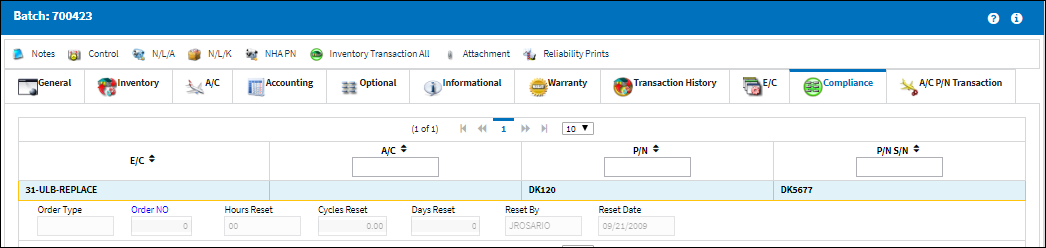
The following options/information is available in this window:
_________________________________________________________________________
E/C
The Engineering Control that specifies aircraft or component scheduled maintenance intervals.
P/N
The Part Number reference for the aircraft part.
P/N S/N
The Serial Number for the specific serialized part.
Order NO
The type of order and the order number for the transaction.
Hours / Cycles / Days Reset
E/C hours/cycles/days at time of reset.
Reset By
The user that accomplished the Work Order (Production or Shop) Closing or Repair Order Receiving.
Reset Date
The date that the E/C was complied with through the Work Order (Production or Shop) bgin Closed or the Repair Order being received.
_________________________________________________________________________
Information for the Hours Reset, Cycles Reset and Days Reset fields are added from the P/N Total Hours and Cycles at compliance.
Download Online Help
Print
|
©1997-2018 Trax USA Corp. All rights reserved. This manual may not be copied, photocopied, reproduced, translated, or converted to any electronic or machine-readable form, in whole or in part, without prior written approval from Trax USA Corp. |
 |